IRCTC Account: Complete Setup & Troubleshooting Guide (2026)

Hook Introduction
Your train leaves in three days. You open IRCTC, try to log in — and nothing. Wrong password? Account not verified? Or maybe you never finished registration at all.
I’ve seen this panic unfold hundreds of times in comment sections, WhatsApp groups, and forum threads. The good news? Every single IRCTC account problem has a fix. This guide walks you through the entire process — from creating a fresh account on your phone to verifying it, troubleshooting a stuck OTP, and even deleting an old account you no longer need.
No tech background required. Let’s get straight into it.
Why Your IRCTC Account Is the Most Important Travel Tool You Own
Without a registered and verified IRCTC account, you simply cannot book a confirmed train ticket online in India. The Indian Railway Catering and Tourism Corporation (IRCTC) is the only authorized platform for e-ticket booking across Indian Railways — covering over 13,000 trains and 8 billion passengers annually.
Your account also unlocks:
- Tatkal booking (priority tickets that open 24 hours before departure)
- Travel insurance during checkout
- PNR tracking and journey alerts
- IRCTC Rail Connect app access for mobile booking
Getting this right once saves you from queues, agents, and last-minute stress every single time you travel.
How to Create an IRCTC Account (Step-by-Step)
Quick Answer (Featured Snippet): To create an IRCTC account, visit www.irctc.co.in, click “Register,” fill in your personal details and contact information, choose a unique User ID, set a strong password, and verify your mobile number and email with OTPs. The process takes under 10 minutes.
Step 1: Go to the Official IRCTC Website or App
Always use the official portal: www.irctc.co.in
If you’re on mobile, download the IRCTC Rail Connect app from the Google Play Store or Apple App Store. Avoid third-party apps — they charge hidden convenience fees and cannot guarantee seat availability.
Step 2: Fill in Your Basic Details
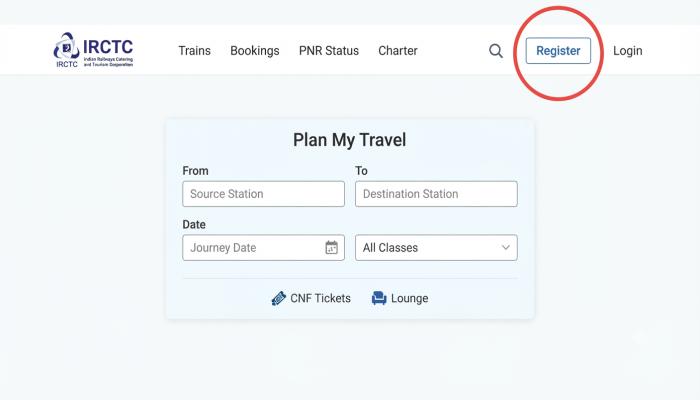
Click “Register” on the top navigation bar. You’ll see a form with four sections:
Personal Details:
| Field | What to Enter |
|---|---|
| First Name | As per government ID |
| Last Name | As per government ID |
| Gender | Select from dropdown |
| Date of Birth | DD/MM/YYYY format |
| Marital Status | Optional |
| Country | India |
| Aadhaar Card Number | Optional but recommended |
| PAN Number | Required for bookings above ₹10,000 |
⚠️ Common Pitfall: Many users enter a nickname instead of their full legal name. IRCTC cross-checks your name against your ID at ticket verification. A mismatch can get you offloaded from the train.
Step 3: Choose Your User ID
Your User ID is permanent. You cannot change it later.
Follow these rules:
- Must be 3–35 characters long
- Can include letters, numbers, and underscores
- No spaces allowed
- Must be unique across the entire platform
Pro Tip: Since IRCTC has over 100 million registered users, common IDs like “rahul123” or “delhi_user” are almost certainly taken. Try combining your name with your city and birth year — for example, arjun_pune_1995.
Step 4: Set Your Password and Security Question
Your password must be:
- Minimum 8 characters
- At least one uppercase letter, one number, and one special character (e.g., @, #, !)
Pick a security question you’ll actually remember. I’ve seen users completely locked out of their accounts because they forgot both their password and their security answer. Write it down somewhere safe.
Step 5: Enter Contact Information
This is critical. Enter:
- Mobile Number: Active Indian number (you’ll receive an OTP)
- Email ID: One you check regularly (another OTP lands here)
Both must be verified before your account becomes active.
Step 6: Complete the CAPTCHA and Submit
Solve the CAPTCHA, click “Submit,” and wait for the registration confirmation screen.
How to Create an IRCTC Account on Mobile
The process on the IRCTC Rail Connect app mirrors the desktop flow with one advantage — your phone’s autofill speeds things up.
- Open the app → Tap “New User? Register Here”
- Fill in all personal and contact details (same fields as above)
- Tap “Register”
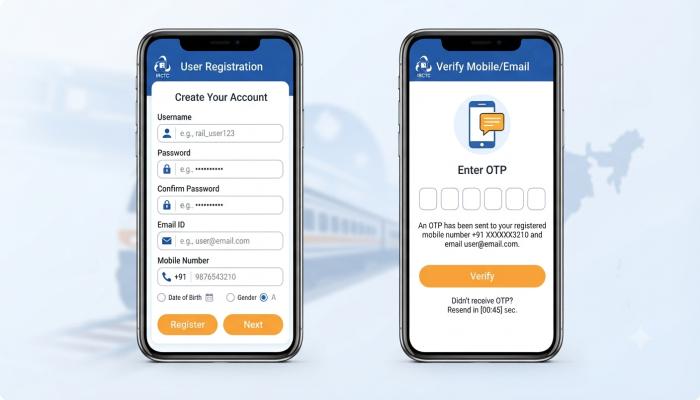
- You’ll be redirected to an OTP verification screen automatically
How to Verify Your IRCTC Account
Quick Answer: After registration, IRCTC sends a verification OTP to both your mobile number and email. Enter both OTPs within 30 minutes to activate your account.
The Exact Verification Process:
- Check your SMS for a 6-digit OTP from IRCTC
- Check your email inbox (and your spam/junk folder — this is where it often hides)
- Enter both OTPs in the verification screen
- Your account is now active
⚠️ IRCTC Account Verification Problem — Common Causes:
| Problem | Fix |
|---|---|
| OTP not received on mobile | Check network signal; request a new OTP after 2 minutes |
| OTP not received on email | Check spam folder; verify you typed the email correctly |
| OTP expired | Click “Resend OTP” — it’s valid for 30 minutes |
| “Mobile number already registered” error | You may already have an account; use “Forgot User ID” to recover |
| Account still inactive after OTP | Clear browser cache and try logging in again |
How to Find Your IRCTC Account (Forgot User ID or Password)
Lost access? Don’t create a new account — that causes booking conflicts and wastes your registered email ID.
To find your User ID:
- Go to www.irctc.co.in → Click “Login”
- Click “Forgot User ID”
- Enter your registered email or mobile number
- Your User ID will be sent to your contact
To reset your password:
- Click “Forgot Password” on the login page
- Enter your User ID
- Answer your security question
- Enter the OTP sent to your mobile
- Set a new password
How to Create an IRCTC Account for Confirmed Ticket Booking
Here’s something most guides skip: a new IRCTC account has booking restrictions.
During the first 48 hours after verification, some users face temporary booking limits. Here’s how to unlock full booking capability quickly:
- Complete your profile 100% — add your full address, PIN code, and nationality
- Add at least one passenger to your Master List (Settings → My Profile → Add Passengers)
- Link a payment method — UPI ID or saved card
- Enable IRCTC iPay wallet for faster checkout
💡 Pro Tip (Unique Insight): IRCTC’s server load peaks between 8:00–8:30 AM (Tatkal opening time). If your account isn’t fully set up with saved passengers and a linked UPI ID, you’ll lose those precious seconds during checkout and miss confirmed seats. Set everything up the night before your booking attempt.
Also Read: Best 5G Phone Under 15000 in India (2026): Real Picks, No Hype
How to Delete Your IRCTC Account
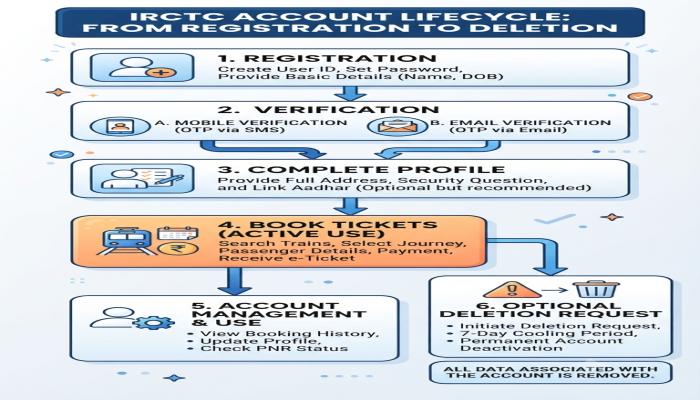
IRCTC doesn’t offer a self-service delete button. Here’s the official process:
- Send an email to care@irctc.co.in
- Subject line: “Request to Delete IRCTC Account — [Your User ID]”
- Include: Your User ID, registered mobile number, and a government ID (for identity verification)
- IRCTC typically responds within 7–10 business days
⚠️ Important: Deleting your account cancels access to all past booking history and e-tickets. Download any important tickets before submitting the deletion request.
Semantic FAQ — People Also Ask
Q1. Can I create an IRCTC account without Aadhaar?
Yes. Aadhaar is optional during registration. You only need a valid mobile number and email. PAN card becomes mandatory only for transactions above ₹10,000.
Q2. How many IRCTC accounts can one person have?
Officially, only one account per individual. IRCTC’s system links accounts to mobile numbers and email IDs. Creating duplicates violates their terms and can get all linked accounts suspended.
Q3. Why is my IRCTC account showing “inactive”?
This usually means mobile or email OTP verification wasn’t completed. Log in, and IRCTC will prompt you to complete verification. If the OTP window has expired, contact IRCTC customer support at 14646.
Q4. Is the IRCTC website (www.irctc.co.in) safe to enter personal details?
Yes. IRCTC uses SSL encryption (look for “https” and the padlock icon). Avoid logging in on public Wi-Fi without a VPN.
Q5. Can I change my User ID after registration?
No. User ID is permanent once registered. Choose carefully during signup.
Q6. How long does IRCTC account verification take?
Verification is instant if both OTPs are entered correctly. The entire registration-to-verification process takes under 10 minutes.
Q7. What if my mobile number is already registered on IRCTC?
Use “Forgot User ID” with that mobile number to recover your existing account. Do not register again with a different number — it creates duplicate records.
official IRCTC Help & Support page at https://www.irctc.co.in/nget/train-searhttps://www.irctc.co.in/nget/train-searchch or the Indian Railways official FAQ portal for authoritative reference.
Your Next-Step Checklist — Don’t Stop at Registration
Registration is just step one. Here’s what to do immediately after your account is verified:
- Log in and confirm your dashboard loads correctly
- Complete your profile — full address, PIN code, occupation
- Add frequent passengers to your Master List (saves time at every booking)
- Link a UPI ID (Google Pay, PhonePe, or BHIM UPI work best)
- Download the IRCTC Rail Connect app if you registered on desktop
- Save the IRCTC helpline number — 14646 — in your contacts
- Book a test ticket (you can cancel within the free cancellation window) to confirm the full flow works
Your account is now ready for real bookings — Tatkal, General, or even tourist packages.