UPI Apps in India: The Complete 2026 Guide for Beginners

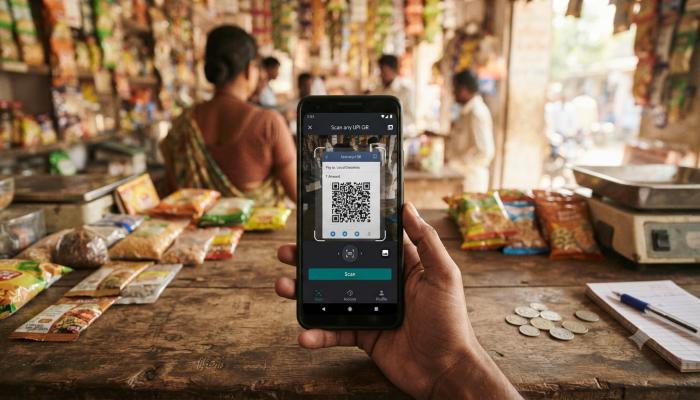
You downloaded a UPI app, linked your bank account, and now you’re staring at the screen wondering: is this thing actually safe? Which app should you even be using? And why does everyone keep saying “RBI approved” like it’s a badge you can check for?
I get this question a lot from people who just moved to India, just got their first salary account, or just watched a parent get scammed and now don’t trust any payment app. Fair concern. Here’s the thing nobody tells beginners upfront: there’s no single “best” UPI app — there’s a best app for your specific habits, and the difference between a safe transaction and a drained account usually comes down to three or four things you can learn in the next ten minutes.
This guide walks you through the real UPI app landscape in India — what’s actually regulated, which apps deserve your trust, how to download and log in properly, and the one scam pattern that catches more beginners than anything else.
Why UPI Apps Matter More Than You Think
UPI isn’t just “another payment app” — it’s the backbone of how India moves money now. In January 2026 alone, UPI processed 21.70 billion transactions, accounting for 81% of all retail digital transactions in India. That’s not a niche tool. That’s the default way rent gets paid, vegetables get bought, and salaries get split between friends.
For a beginner, that matters for two reasons. First, you’re not choosing between “UPI or no UPI” — you’re choosing which app sits on top of the same underlying system. Second, because UPI is so dominant, it’s also the most targeted system for fraud in the country. Understanding the difference between the app (Google Pay, PhonePe, Paytm) and the system (UPI, run by NPCI) is the first thing that’ll make you a safer user.
What Is a UPI App? (Quick Definition)
A UPI app is a mobile application — like Google Pay, PhonePe, or BHIM — that lets you send and receive money instantly between bank accounts using a Virtual Payment Address (VPA) or QR code, without sharing account numbers or IFSC codes. Every UPI app runs on NPCI’s shared UPI network, so money moves the same way regardless of which app you use.
The apps themselves don’t hold your money (unless they also offer a separate wallet feature). They’re just the front door to your actual bank account.
The “RBI Approved” Myth, Explained
Here’s something that trips up almost every beginner, and most articles get it wrong or skip it entirely: there is no official “RBI approved UPI apps list.” People search for this phrase constantly, but it’s based on a misunderstanding.
The RBI grants regulatory approvals for entities in the digital payments ecosystem, and all UPI applications function under the regulatory framework established by the RBI and the operational guidelines set by NPCI — but RBI doesn’t issue a curated whitelist of individual consumer apps the way it does for, say, NBFCs. What actually happens is this: NPCI certifies a bank or a Third-Party App Provider (TPAP) to offer UPI services, and that certification is what you should be checking — not a mythical “RBI list.”
What to check instead of hunting for an “RBI approved” badge:
- The app is linked through NPCI’s official UPI framework (Google Pay, PhonePe, Paytm, BHIM, and other major apps all qualify)
- It’s available on the official Google Play Store or Apple App Store listing (not a sideloaded APK)
- It asks for UPI PIN setup through your bank, not through the app directly
Top UPI Apps in India: Quick Comparison
Before the deep dive, here’s the snapshot beginners usually want first.
| UPI App | Best For | Owned By | Standout Feature |
|---|---|---|---|
| Google Pay (GPay) | Simplicity, P2P transfers | Clean interface, scratch card rewards | |
| PhonePe | All-round usage, bill payments | Walmart-backed | Largest market share, broad merchant network |
| Paytm | Bills, recharges, ticketing | One97 Communications | Supports bills, movies, flights, and metro recharge |
| BHIM | Government-backed trust, no ads | NPCI | Official UPI app launched by NPCI in 2016, built to promote digital payments and financial inclusion |
| Amazon Pay | Amazon shoppers | Amazon | Cashback and special offers, especially on Amazon purchases |
| CRED | Credit card management | CRED | Invite-based, rewards for on-time bill payments |
| WhatsApp Pay | Chat-based transfers | Meta | Send money directly within WhatsApp chats |
Pro tip from experience: Don’t pick one and stop there. I keep two UPI apps installed — a primary one for daily spending, and a backup. NPCI’s servers occasionally get overloaded during peak hours (salary days, festival sales), and when one app fails to process a payment, switching to the second app saves you from standing awkwardly at a billing counter while your transaction spins.
How to Download a UPI App (Step-by-Step)
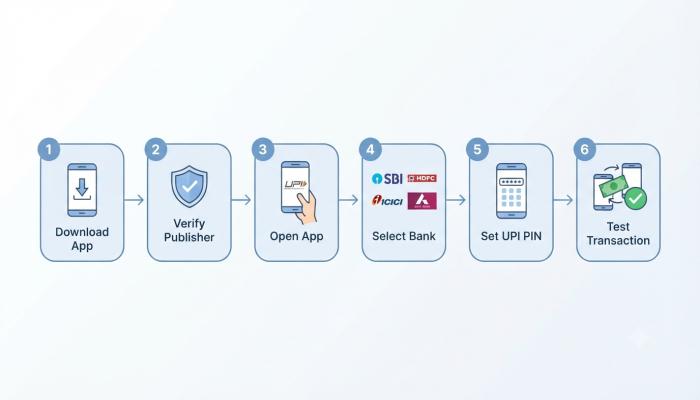
- Go to the official store — Google Play Store for Android, App Store for iPhone. Never download UPI apps from a link sent over SMS or WhatsApp.
- Verify the publisher name matches the official company (e.g., “Google LLC” for Google Pay, “PhonePe Private Limited” for PhonePe).
- Install and open the app — it will ask for SIM verification using the mobile number linked to your bank account.
- Select your bank from the list and let the app fetch your linked account automatically.
- Set your UPI PIN — a 4 or 6-digit code you’ll use to authorize every transaction. This is created through your bank’s secure gateway, not stored by the app itself.
- Do a small test transaction (₹1 to a friend) before relying on the app for anything big.
Common Pitfall: Downloading Look-Alike Apps
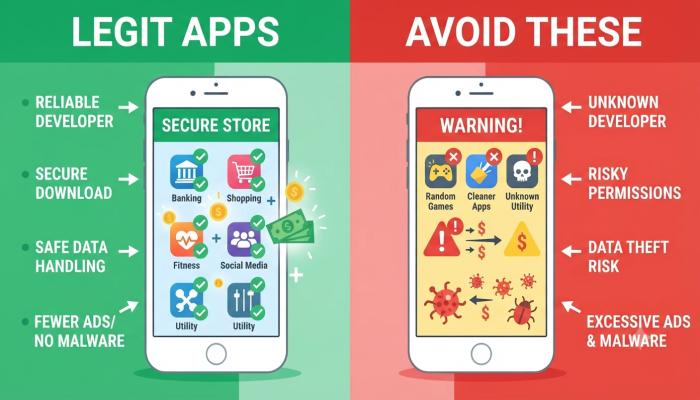
A surprising number of fraud cases start with someone downloading a fake app with a similar icon and name, found through a search ad or a forwarded link rather than the official store search bar. Always type the app name directly into Play Store/App Store search — don’t tap links from messages claiming to be “official UPI app download” links.
How to Log In to a UPI App
Logging in works differently from typical apps because there’s no traditional username/password — it’s tied to your phone’s SIM and your UPI PIN.
- Open the app and it auto-detects your registered mobile number via SIM.
- Some apps add a secondary lock (fingerprint, face unlock, or app-specific passcode) for opening the app itself.
- For transactions, you’ll always enter your UPI PIN — this is separate from your app lock.
- If you switch phones, you’ll need to re-register the app with your new device’s SIM and reset your UPI PIN through your bank.
Lost access or changed your number? You’ll need to visit your bank (or use their app/net banking) to update your registered mobile number before any UPI app will work again. This step trips up a lot of people who assume the UPI app itself can fix it — it can’t, because the SIM-bank linkage lives with your bank, not the app.
Also Read: Best Rummy Apps for Beginners: What Actually Works in 2026
UPI Apps for Android vs. iOS: Does It Matter?
Functionally, no — every major UPI app (Google Pay, PhonePe, Paytm, BHIM) works near-identically on both platforms. The differences are minor:
- Android apps sometimes get new features (like voice payments or UPI Lite updates) a few weeks before iOS due to faster rollout cycles.
- iOS users get tighter OS-level security (App Tracking Transparency, sandboxing) but slightly fewer customization options within apps like PhonePe.
- SMS-based OTP autofill is smoother on Android; iPhone users occasionally need to copy-paste OTPs manually.
If you’re a beginner choosing a phone and a UPI app at the same time, don’t let this factor drive your decision — pick the app based on the features table above instead.
BHIM UPI: Why It’s Different From the Rest
BHIM deserves its own mention because beginners often assume it’s “just another app” when it’s actually the government’s reference implementation. BHIM (Bharat Interface for Money) is a mobile payment application developed by NPCI that allows users to send and receive money instantly using UPI. It doesn’t push ads, doesn’t have a wallet upsell, and doesn’t try to cross-sell you loans or investments — which makes it a genuinely good “neutral” choice if you want a no-frills app purely for transfers.
The trade-off: BHIM’s interface feels dated next to PhonePe or Google Pay, and merchant QR code support is thinner in smaller towns.
Beyond the Smartphone: UPI Lite and UPI 123PAY
This is the part most “top UPI apps” articles skip entirely, and it’s genuinely useful if you’re buying a UPI app for an older family member or live in an area with patchy internet.
- UPI Lite lets you make small payments without entering your UPI PIN every time, and works even with weak connectivity. UPI Lite has limits of ₹1,000 per transaction, ₹10,000 daily, with a maximum wallet balance of ₹5,000 — ideal for chai stalls, bus tickets, and small daily purchases.
- UPI 123PAY is built for people without a smartphone at all. It lets the 400 million feature phone users in India access UPI services without an internet connection, using IVR calls, missed calls, OEM-based apps, or sound-based proximity payments. If you’re setting up payments for a parent or grandparent on a basic Nokia-style phone, this — not a smartphone app — is what you want.
Also Read: Best Earning Apps in 2025: Make Real Money From Your Phone
The #1 Scam Beginners Fall For (And How to Avoid It)
This is the single most important section in this guide, so read it twice if you have to.
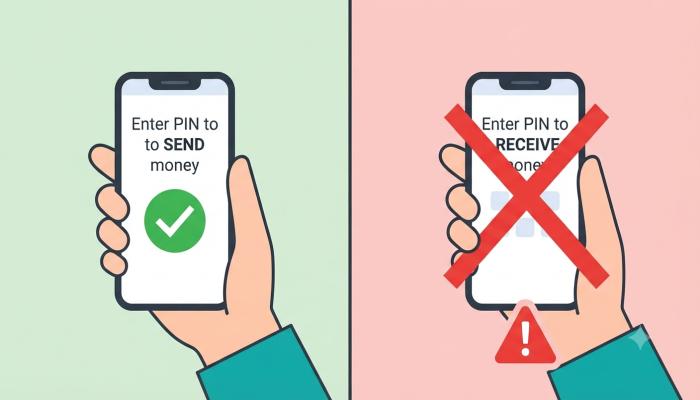
The most common UPI fraud doesn’t involve any technical hack — it’s social engineering. A scammer calls pretending to be a buyer or a bank representative, asks you to “accept” a payment, and tricks you into approving a collect request, which actually debits your account rather than crediting it.
The rule that saves you every time: you only ever need your UPI PIN to send money. You never, ever need it to receive money. If anyone — a “buyer,” a “delivery agent,” a “bank employee” — asks you to enter your PIN to receive a refund or payment, hang up. It’s a scam, no exceptions.
If you do get caught out, NPCI’s dispute resolution process means your bank is obligated to investigate and, in many cases, reverse unauthorized transactions if reported within the stipulated window. Report it immediately through your bank’s app or by calling 1930 (India’s cybercrime helpline).
Visual Asset Strategy
Semantic FAQs
Is there an official RBI approved UPI apps list?
No. RBI doesn’t publish a specific approved-apps list; UPI apps operate under NPCI certification within RBI’s broader regulatory framework for digital payments.
Which is the safest UPI app in India?
Major apps like Google Pay, PhonePe, Paytm, and BHIM are all equally safe at the protocol level since they share NPCI’s UPI infrastructure — safety mostly depends on your own habits (PIN secrecy, avoiding collect-request scams) rather than the app choice.
Can I use two UPI apps with the same bank account?
Yes. You can link the same bank account to multiple UPI apps simultaneously, which is useful as a backup during server downtime.
Do I need internet to use a UPI app?
Standard UPI apps need internet, but UPI Lite supports limited offline functionality, and UPI 123PAY works entirely without internet through IVR, missed calls, or sound-based payments.
What’s the maximum amount I can send via UPI in a day?
The general UPI transaction limit is ₹1 lakh per day, capped at 20 transactions, though specific categories like IPO applications can go up to ₹5 lakh, and individual banks may set tighter limits.
Is BHIM better than Google Pay or PhonePe?
BHIM is a solid, ad-free, government-backed option for pure transfers, but it lacks the broader merchant network, rewards, and bill-payment ecosystem that PhonePe and Google Pay offer.
What should I do if I sent money to the wrong UPI ID?
Contact your bank’s customer care immediately and file a complaint through the app’s “raise dispute” option — most banks can intervene within hours if reported quickly, though recovery isn’t guaranteed once funds are withdrawn.
Your Next Step: A Quick-Start Checklist
You don’t need to master all seven apps in this guide today. Here’s what to actually do next:
- [ ] Pick one primary UPI app from the comparison table based on your main use case (transfers, bills, or shopping)
- [ ] Download it only from the official Play Store/App Store — verify the publisher name
- [ ] Set up your UPI PIN through your bank’s official flow, never through a third-party link
- [ ] Send yourself a ₹1 test transaction before using it for anything significant
- [ ] Save the rule: PIN to send, never to receive
- [ ] Install a second backup UPI app in case of server downtime
Once you’ve got your primary app set up and tested, you’re ready to actually use UPI the way 81% of digital India already does — for everything from splitting a dinner bill to paying your electricity provider.