OTT Apps in India: The Beginner’s Guide to Choosing, Downloading, and Actually Using Them

I still remember the first time someone told me to “just watch it on OTT.” I nodded like I understood, then spent the next twenty minutes Googling what that even meant. If you’re in that spot right now, you’re not behind — you’re just new to a system that genuinely confuses most first-time users.
This guide skips the jargon. You’ll know exactly what an OTT app is, which ones are worth your money in 2026, how to download and log in without errors, and one subscription mistake I see beginners make constantly — one that’s costing real users real money right now.
Why OTT Apps Matter (And Why Everyone’s Talking About Them)
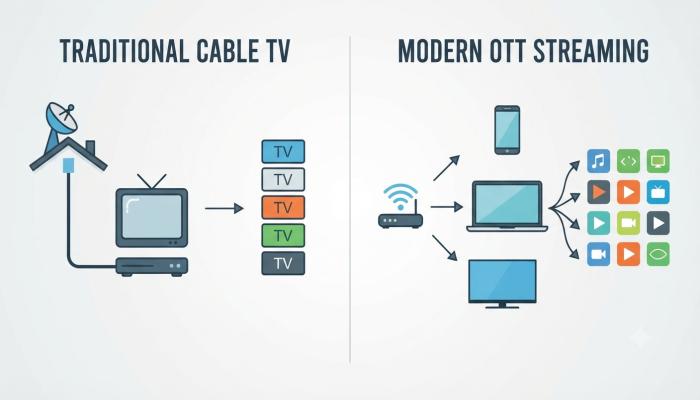
OTT stands for “Over-The-Top” — content delivered straight over the internet, bypassing cable boxes and satellite dishes entirely. India’s OTT market has over 549 million streaming users expected by 2026, with the market projected to touch $4.5 billion in total revenue. That’s not a niche habit anymore. It’s how most of India watches movies, cricket, and web series.
The reason this matters for you as a beginner: with that much money and competition in play, platforms are merging, renaming, and changing pricing constantly. The “best app” list from even six months ago is already outdated. That’s exactly why getting this right today saves you from subscribing to something that’s about to be discontinued or rebranded.
What Is an OTT App? (Quick Definition)
An OTT app is a mobile or smart TV application that streams movies, shows, and live sports directly over your internet connection — no cable subscription, dish, or set-top box required. You download it, create an account, pick a plan (free or paid), and start watching instantly on your phone, tablet, laptop, or TV.
Common entities you’ll run into while exploring this space: SVOD (subscription video-on-demand), AVOD (ad-supported video-on-demand), TVOD (pay-per-view), content aggregators, smart TV apps, and regional language libraries. You don’t need to memorize these — just recognize them when you see them on a pricing page.
Best OTT Apps in India: The Real 2026 List
Here’s where most guides just dump a list of 15 logos and call it a day. I’m going to tell you which ones are actually worth downloading based on what you watch.
Top 10 OTT Apps in India (2026)
| App | Best For | Starting Price | Notable Feature |
|---|---|---|---|
| JioHotstar | Sports, Disney/Marvel, Indian originals | ₹79/month (Mobile tier) | Live streaming of IPL, ICC events, WPL, and Premier League with 4K and AI-powered analytics |
| Netflix | Premium global + Indian originals | ₹149/month (mobile plan) | Polished storytelling, no ads on most tiers |
| Amazon Prime Video | Value bundling with shopping perks | ₹299/month or ₹1,499/year | Bundled with Prime shopping and music benefits, plus X-Ray cast/trivia overlay |
| SonyLIV | Sports + TV show catch-up | ₹299/month | 40,000+ hours of content including 700+ movies, strong cricket coverage |
| ZEE5 | Hindi & regional drama | ₹149/month | Large Indian originals catalog |
| Aha | Telugu content | ₹99/month | Best platform for Telugu and Tamil original content |
| MX Player | Free movies & shows | Free (ad-supported) | Popular Bollywood, Hindi web series, and dubbed Hollywood titles at no cost |
| Apple TV+ | Small libraries, big quality | ₹99/month | Family Sharing for up to 6 members |
| JioCinema (merged) | Now part of JioHotstar | — | Folded into JioHotstar after 2025 merger |
| Hoichoi | Bengali content | ₹99/month | Dedicated regional originals |
Pro Tip Box: The Beginner’s Selection Rule
Don’t pick apps by brand recognition. Pick by what you actually watch. If you’re a cricket fan, JioHotstar or SonyLIV beats Netflix every time. If you mostly want Hollywood and prestige dramas, Netflix wins. I’ve watched too many beginners pay for three apps they barely open because they subscribed based on ads, not habits.
Also Read: Best Earning Apps in 2026: A Beginner’s No-Nonsense Guide
OTT Apps for Android: Download & Setup
How to Download OTT Apps on Android
- Open the Google Play Store on your device.
- Search the exact app name (e.g., “JioHotstar,” not “Hotstar” — names have changed post-merger).
- Tap Install and wait for it to download.
- Open the app and tap Sign Up or Get Started.
- Choose login via mobile number, email, or Google/Apple account.
- Verify with the OTP sent to your phone.
- Select a plan — free tier first if you’re testing the waters.
Common Pitfalls Box: Android-Specific Issues
- App not found? You’re likely searching an old name. JioCinema no longer exists as a standalone listing — it’s JioHotstar now.
- Install fails on older phones: Most major OTT apps require Android 8.0+. Check your device settings under “About Phone” if installation stalls.
- App crashes after update: Clear cache via Settings > Apps > [App Name] > Storage > Clear Cache before reinstalling.
OTT Apps Login & Registration: Doing It Right the First Time
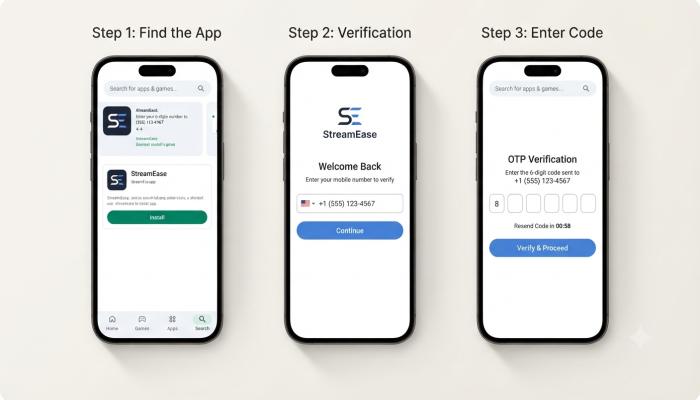
To register on most OTT apps, you need an active mobile number or email, a stable internet connection, and a payment method if you’re choosing a paid tier. The process takes under five minutes for free tiers and slightly longer for paid sign-ups requiring card or UPI verification.
Step-by-Step Registration
- Download the app from Play Store or App Store.
- Tap Sign Up.
- Enter mobile number or email.
- Verify via OTP or email link.
- Set a password (some apps skip this and use OTP-only login each time).
- Choose your plan — free, ad-supported, or premium.
- If paid, complete UPI/card payment and confirm the autopay mandate.
Login Troubleshooting
- OTP not arriving: Check if your number is linked correctly; switch to email login as backup.
- “Account already exists” error: You may have signed up previously via a telecom bundle (like a Jio or Airtel recharge offer) — try logging in instead of registering fresh.
- Stuck on loading screen: Usually a server-side issue during high-traffic events like IPL — wait 10–15 minutes and retry.
The One Mistake That’s Costing Beginners Money Right Now
Here’s something I haven’t seen covered clearly anywhere else, and it’s genuinely important if you’re considering an “all-in-one” OTT bundle app.
Information Gain / Pro-Tip: OTTplay, one of the most recommended “all-in-one OTT” apps in older articles, announced in May 2026 that it would discontinue offering new OTTplay Premium subscriptions, though existing subscriptions continue to be supported. If you’re reading a “best all-in-one OTT apps” list published before mid-2026, it’s likely recommending a product you literally cannot sign up for anymore.
The lesson: before you commit to any bundling or aggregator app, check the app’s own Play Store listing for recent update notes and reviews dated within the last 30 days. Listicles get stale fast in this industry — the apps themselves don’t lie about service changes the way third-party blogs do.
All-in-One OTT Apps: Are They Worth It?
Bundling apps combine multiple platforms under a single subscription so you’re not juggling five separate logins and five separate bills.
Current legitimate options:
- Airtel Xstream Play — designed for Airtel customers to manage plans and discover content across multiple OTT platforms without switching applications.
- Tata Play Binge — groups OTT platforms under tiered plans, with strong support for Hindi, Tamil, Telugu, and Malayalam content optimized for smart TV viewing.
- Vi Movies & TV — telecom-linked bundle covering 13+ language partners starting around ₹154.
Also Read: UPI Apps in India: The Complete 2026 Guide for Beginners
Comparison Table: Bundle Apps vs Individual Subscriptions
| Factor | Bundled OTT App | Individual App Subscriptions |
|---|---|---|
| Monthly cost | Often lower combined | Higher if subscribing to 3+ apps |
| Convenience | One login, one bill | Multiple logins, multiple bills |
| Content control | Limited to bundle partners | Full access to each app’s full catalog |
| Best for | Casual viewers, budget-conscious users | Heavy viewers with specific platform loyalty |
OTT Releases This Week: How to Stay Updated Without the Guesswork
New content drops constantly — Hindi, Telugu, Tamil, and English releases land on different days across platforms. Rather than checking five apps daily, here’s the beginner-friendly approach:
- Turn on push notifications inside each app for “new releases” — most apps have this buried in Settings > Notifications.
- Follow each platform’s official app listing page weekly; release schedules shift around big sporting events (cricket tournaments tend to push movie releases earlier or later).
- Use content-discovery features inside aggregator apps like Tata Play Binge, which surface what’s new across multiple platforms in one feed.

Semantic FAQ
1. What does OTT stand for?
OTT stands for “Over-The-Top,” referring to content streamed directly via the internet rather than through cable or satellite providers.
2. Are OTT apps free in India?
Some are. MX Player and select free tiers of platforms like SonyLIV and JioHotstar offer ad-supported free content, though premium shows usually sit behind a paywall.
3. Which OTT app is best for beginners in India?
It depends on preference — JioHotstar suits sports fans, Netflix suits global show lovers, and Prime Video offers solid value with mixed content. Start with whichever matches your most-watched genre.
4. Can I use one app to access all OTT platforms?
Partially. Bundling apps like Tata Play Binge or Airtel Xstream Play combine select partner platforms, but no single app legally hosts every OTT service’s full catalog.
5. Why does my OTT app keep logging me out?
Usually due to app cache issues, an expired session token, or simultaneous device-limit restrictions on your plan tier. Clearing cache and re-logging in resolves most cases.
6. Is JioCinema still a separate app?
No. JioCinema merged with Disney+ Hotstar to form JioHotstar, which controls approximately 85% of India’s streaming market by combined reach after the merger.
7. How do I cancel an OTT subscription?
Go to the app’s account settings, find “Manage Subscription,” and cancel directly — or manage it through your Play Store/App Store subscription settings if you signed up there, since cancelling only in-app sometimes doesn’t stop the autopay mandate.
Your Next Step: A Quick-Start Checklist
You don’t need to download ten apps today. Start small:
- [ ] Identify your top genre (sports, regional cinema, global shows, or casual binge content)
- [ ] Pick one primary paid app that matches it
- [ ] Add one free app (like MX Player) for backup content
- [ ] Set up login with OTP — skip passwords where possible to avoid lockouts
- [ ] Turn on new-release notifications inside your chosen app
- [ ] Revisit your subscriptions every 3 months — cancel what you’re not using