Meesho App: The Complete Beginner’s Guide (Download, Login & Start Shopping)

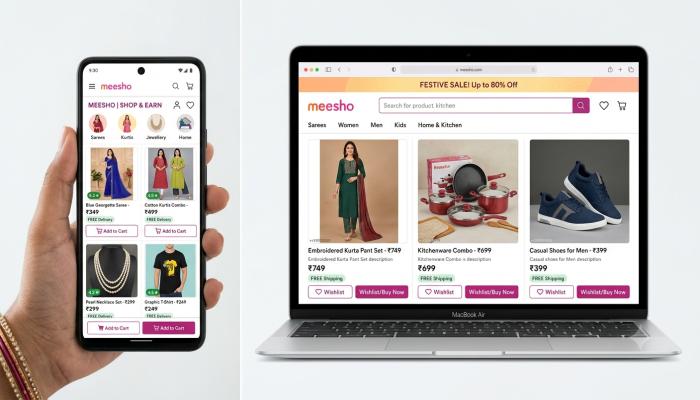
You’ve probably heard someone mention Meesho — maybe a friend who’s been reselling sarees from home, or a family member who found a kurta for ₹199 that looked like a ₹800 product. And now you’re curious: what exactly is this app, and how do you get started?
Here’s the short answer:
Meesho is a free Indian social commerce app that lets you shop for budget-friendly products or resell them to friends and family via WhatsApp, Facebook, and Instagram — earning a profit margin you set yourself. It connects small suppliers directly to buyers, cutting out the middleman.
I’ve seen dozens of first-time users get confused about where to download it safely, how the login works, and whether it runs on a PC or iPhone. This guide clears all of that up, step by step.
Why Meesho Has Become India’s Go-To Shopping App
Meesho isn’t just another e-commerce platform. It was specifically designed for Tier 2 and Tier 3 cities in India — places where people want quality products at honest prices without paying a Flipkart or Amazon premium.
A few things that make it stand out:
- Zero commission for resellers (Meesho removed seller commission entirely)
- Products start as low as ₹99
- Over 120 million registered users across India
- Available in multiple regional languages including Hindi, Tamil, Telugu, and Kannada
- Weekly payments directly to your bank account if you’re a reseller
If you’re a buyer, you get deep discounts on fashion, home goods, and electronics. If you’re a reseller, you get a free business without ever managing stock. Either way, the first step is getting the app on your device.
How to Download the Meesho App on Android
This is the most common route, since Meesho was built first for Android.
Steps to download on Android:
- Open the Google Play Store on your phone
- Tap the search bar and type “Meesho”
- Look for the official app — developer listed as Fashnear Technologies Private Limited
- Tap “Install” and wait (the app is around 30–40 MB)
- Once installed, tap “Open”
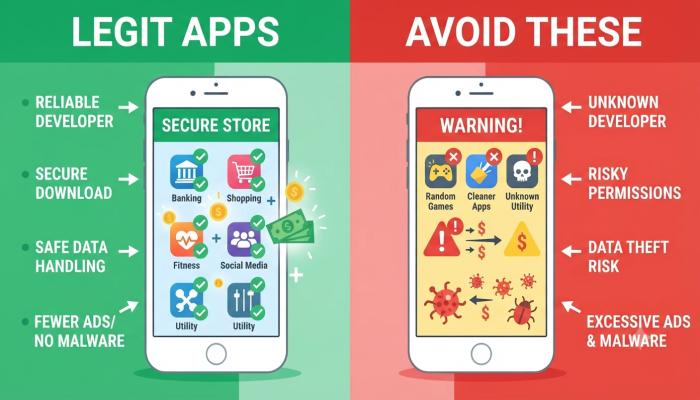
🔴 Common Pitfall: Several fake “Meesho” apps exist on third-party sites. Always download from the Google Play Store or the official Meesho website. If someone sends you a random APK file, do not install it — it may contain malware.
Also Read: Best Camera Phone in 2026: A Beginner’s No-Nonsense Guide
How to Download the Meesho APK (Safe Method)
If the Play Store isn’t working for you — maybe your device is older or has storage issues — you can download the Meesho app APK directly from Meesho’s official website.
Steps:
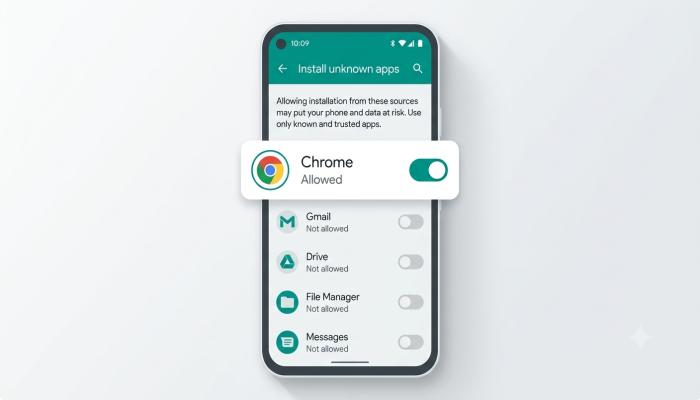
- Open Chrome on your Android phone
- Go to:
meesho.comand look for the app download banner - Tap “Download App” — this triggers the official APK download
- Before installing, go to Settings → Security → Enable “Install Unknown Apps” for Chrome
- Tap the downloaded file and hit “Install”
💡 Pro-Tip: After installation, turn that “Install Unknown Apps” toggle back off. This is a basic security habit most guides never mention — but leaving it on permanently exposes your phone to accidental malware installs from other sources.
How to Download Meesho in Chrome on PC
The Meesho app doesn’t have a native Windows or Mac desktop software. But you can access everything through your browser — and it works surprisingly well.
Method 1: Use the Meesho Website on PC
- Open Google Chrome on your PC
- Go to meesho.com
- Log in with your mobile number
- Shop or manage your reseller account exactly like the app
Method 2: Install Meesho as a PWA (Progressive Web App)
This is a lesser-known trick. In Chrome on PC:
- Visit
meesho.com - Click the install icon (looks like a small screen with a “+” symbol) in the Chrome address bar
- Click “Install”
- Meesho now appears as a desktop shortcut — it opens in its own window, almost like a native app
Method 3: Use an Android Emulator
For the full app experience on PC:
- Download BlueStacks (a free Android emulator) from bluestacks.com
- Install the Meesho app from Play Store within BlueStacks
- Log in and use it just like on a phone
This is especially useful for resellers who manage large product catalogs and prefer a bigger screen.
How to Download Meesho on iPhone
Meesho has an official iOS app available on the Apple App Store.
Steps:
- Open the App Store on your iPhone
- Search for “Meesho”
- Tap “Get” to download (it’s free)
- Once installed, open and sign in with your Indian mobile number
⚠️ Note for iPhone Users: Some features — particularly the reseller sharing flow — work better on Android. The iOS version is fully functional for shopping, but if you plan to actively resell via WhatsApp, Android gives you a smoother experience due to deeper app integration.
How to Log In to the Meesho App
Once you have the app open, logging in is straightforward.
Meesho login steps:
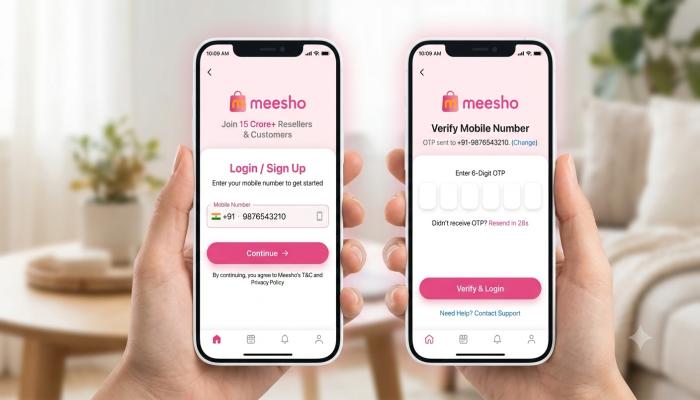
- Tap “Continue with Phone Number”
- Enter your Indian mobile number (+91)
- You’ll receive an OTP via SMS
- Enter the OTP — and you’re in
No email required. No password to remember. Your phone number is your account.
First-time setup tips:
- Add your name and a profile photo (helps build trust if you’re reselling)
- Set your preferred language
- Add a UPI ID or bank account if you want to receive reseller earnings
Meesho App: Platform Availability at a Glance
| Platform | Method | Full App Features? |
|---|---|---|
| Android | Google Play Store | ✅ Yes |
| Android (APK) | Official Website / Chrome | ✅ Yes |
| iPhone (iOS) | Apple App Store | ✅ Mostly (some limits) |
| PC / Laptop | Browser (meesho.com) | ✅ Shopping & account |
| PC (App feel) | Chrome PWA install | ✅ Near-full experience |
| PC (Full app) | BlueStacks emulator | ✅ Complete Android app |
Frequently Asked Questions
1. Is the Meesho app free to download and use?
Yes, completely free. There are no subscription fees, no download charges, and — if you’re a reseller — zero commission on sales. Meesho earns through advertising and logistics partnerships.
2. Is Meesho available outside India?
Meesho is designed for India and requires an Indian (+91) mobile number to register. It’s not officially available in other countries.
3. Can I use Meesho without a smartphone?
Yes. Visit meesho.com on any desktop or laptop browser and log in with your mobile number. The web version supports both shopping and seller account management.
4. What’s the difference between Meesho APK and the Play Store version?
Functionally, they’re the same app. The APK is just a manual installation file — useful when the Play Store is unavailable. Always download it from the official Meesho website, never from random third-party sites.
5. How do I fix the Meesho app if it won’t open?
Try these in order: clear the app cache (Settings → Apps → Meesho → Clear Cache), check your internet connection, then uninstall and reinstall. Most opening issues are cache or connectivity related.
6. Can I have two Meesho accounts on one phone?
Not directly. Meesho ties one account to one mobile number. To use two accounts, you’d need a dual-SIM phone with a parallel app clone feature (available on most Xiaomi, Samsung, and Realme devices).
7. Is Meesho safe for online payments?
Yes. Meesho uses SSL encryption and supports UPI, debit/credit cards, net banking, and cash-on-delivery. COD is the most popular option among first-time buyers who want to inspect before paying.
Your Next Step Checklist
Don’t just read this and close the tab. Here’s exactly what to do in the next 10 minutes:
- Download the Meesho app from the Play Store, App Store, or meesho.com
- Log in using your mobile number and OTP
- Browse the “Fashion” or “Home & Kitchen” category to see the price range
- If you want to resell: Tap any product → “Share & Earn” → set your margin → send to WhatsApp contacts
- Add a payment method (UPI recommended for fastest refunds)
- Place one small order — even a ₹99 product — to experience the delivery and return process firsthand
The Meesho app is genuinely one of the lowest-barrier ways to either save money shopping or start a side income from your phone. The download takes under two minutes. The login takes thirty seconds. What happens after that is entirely up to you.
[Your CTA Here — e.g., “Download Meesho Now and Get ₹100 Off Your First Order” / “Start Reselling Today — It’s Free”]