Free VPN: The Only Guide Beginners Actually Need (2026)

You opened this tab because you don’t want to pay for a VPN — at least not yet. Fair. But you’ve probably already noticed the internet is full of “free VPN” apps that either throttle your speed to 2 Mbps, sell your browsing data, or just plain don’t work.
I’ve tested dozens of them. Most are traps. A handful are genuinely useful. This guide cuts through the noise.
What Is a Free VPN — and How Does It Actually Work?
A free VPN (Virtual Private Network) is a tool that routes your internet traffic through an encrypted tunnel and masks your real IP address, letting you browse privately without paying a monthly fee. Most free VPNs offer a limited version of a paid product — capped data, fewer servers, or slower speeds.
In plain English: It hides what you’re doing online and makes it look like you’re somewhere else.
Here’s what happens the moment you connect:
- Your device connects to a VPN server (e.g., in Germany)
- Your ISP sees encrypted traffic — not your actual browsing
- Websites see the VPN server’s IP, not yours
- Your data is protected on public Wi-Fi networks
Why Using a VPN Matters More Than You Think
Skipping a VPN on public Wi-Fi isn’t just risky — it’s genuinely dangerous. On an unencrypted network at a café or airport, anyone with basic tools can intercept login credentials, emails, or payment details. That’s not a scare tactic — it’s a well-documented attack called a “man-in-the-middle” attack.
Beyond security, VPNs matter for:
- Privacy: Your Internet Service Provider (ISP) logs every site you visit. A VPN encrypts that activity.
- Access: Some content is geo-restricted (streaming libraries, news sites) — a VPN bypasses those blocks.
- Safety on public networks: Hotels, airports, and cafés are prime hunting grounds for data thieves.
📌 Pro-Tip (You Won’t See This Elsewhere): Most beginners only think about VPNs for streaming. But the single biggest practical benefit for everyday users is on mobile data networks — your carrier can legally sell your browsing history in many countries. A free VPN running in the background kills that without costing a cent.
The Best Free VPNs Right Now (Honest Comparison)
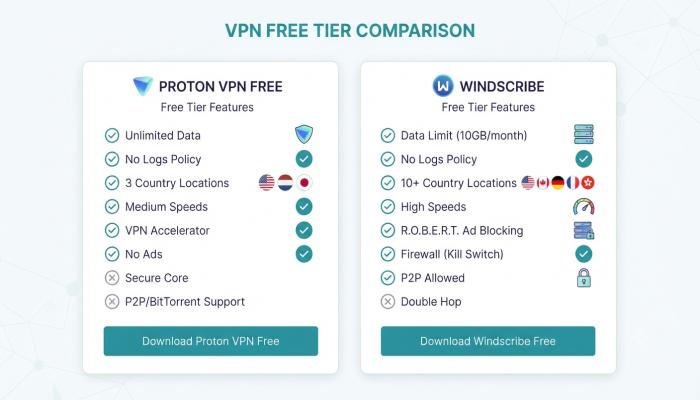
Not all free VPNs are created equal. Here’s a side-by-side breakdown of the ones I’d actually recommend to a friend:
| VPN | Data Limit | Speed | Platforms | Logs Policy | Best For |
|---|---|---|---|---|---|
| Proton VPN Free | Unlimited | Medium | Android, iOS, PC, Mac | Strict no-logs | Best overall free pick |
| Windscribe | 10 GB/month | Fast | Android, iOS, PC, Chrome | No-logs | Streaming + browsing |
| hide.me | 10 GB/month | Fast | Android, iOS, PC | No-logs | Privacy-focused users |
| Hotspot Shield | 500 MB/day | Fast | Android, iOS, PC | Limited logs | Casual daily use |
| TunnelBear | 2 GB/month | Medium | Android, iOS, PC, Chrome | No-logs | Occasional use |
My honest pick for most beginners: Proton VPN Free.
It’s the only truly unlimited free VPN from a credible provider (Proton is the team behind ProtonMail, based in Switzerland). No data caps. No speed throttling beyond what their free servers can handle. No catch I’ve found after two years of using it myself.
Also Read: ChatGPT: The Beginner’s Complete Guide to Getting Started (Free & Fast)
How to Get a Free VPN: Step-by-Step Setup
For Android (Free VPN APK / Play Store)
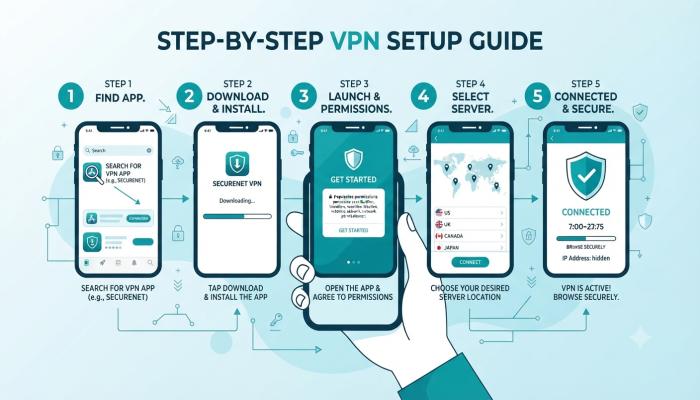
Setting up a free VPN for Android takes under 3 minutes:
- Open the Google Play Store
- Search for “Proton VPN” (or your chosen app)
- Tap Install
- Open the app → Create a free account with your email
- Tap Quick Connect
- Done — your traffic is now encrypted
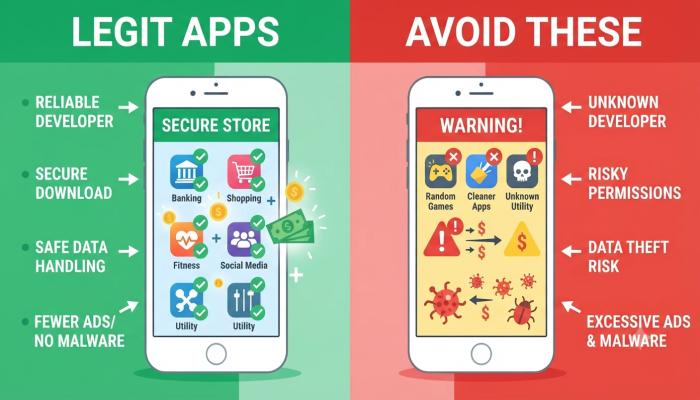
⚠️ Common Pitfall: Never download a Free VPN APK from a random website. Side-loaded APKs bypass Google’s security checks and have historically been bundled with spyware. Stick to the Play Store.
For PC (Windows & Mac — Free VPN Download)
- Go to the official website of your chosen VPN (e.g., protonvpn.com)
- Click Download Free VPN for PC
- Run the installer (.exe for Windows, .dmg for Mac)
- Create a free account
- Log in → Select a free server location → Connect
For Download Free VPN for PC users: Always download from the official site, not a third-party mirror. Check the URL carefully — fake VPN sites are a real phishing vector.
Free VPN for Chrome (Browser Extension)
If you don’t want a full app, a Chrome VPN extension is a lighter option. Windscribe and TunnelBear both offer free Chrome extensions.
- Open Chrome → Go to the Chrome Web Store
- Search “Free VPN Chrome” → Install Windscribe or TunnelBear
- Click the extension icon in your toolbar
- Sign up → Toggle the VPN on
Important limitation: A Chrome extension only protects browser traffic — not your other apps (Spotify, Discord, etc.). For full-device protection, use the desktop app.
Free VPN for iPhone (iOS)
- Open the App Store
- Search “Proton VPN“ or “Windscribe”
- Install → Create account → Connect
On iPhone, go to Settings → VPN after installation to enable the VPN profile. This lets iOS connect automatically.
What Free VPNs Can’t Do (Be Honest With Yourself)
Free VPNs have real limitations. Here’s what you should know before committing:
- Slower speeds: Free servers are shared. Expect 30–60% slower connections on average.
- Data caps: Except for Proton VPN, most free options cap you at 2–10 GB/month.
- Fewer server locations: You might have 3 country options vs. 60+ on a paid plan.
- No P2P/torrenting: Free tiers rarely allow torrenting.
- No streaming unblocking: Netflix actively blocks most free VPN IP addresses.
If you need a VPN for streaming or heavy daily use, a paid plan (like Proton VPN Plus or NordVPN) is worth the ~$4/month.
⚠️ Common Pitfalls Box
Mistakes I see beginners make constantly:
- Downloading a VPN with 50,000+ reviews but no privacy audit. Reviews can be bought. Look for VPNs with published third-party audits (Proton VPN has one).
- Using a VPN and thinking you’re anonymous. A VPN hides your traffic from your ISP — it doesn’t stop Google from knowing who you are when you’re logged in.
- Leaving the VPN on during banking. Some banks flag VPN traffic as suspicious and lock accounts. Temporarily disable it for banking.
- Choosing a VPN based purely on free data. A VPN that sells your data (many do) is worse than no VPN at all.
Visual Asset Strategy
Image
Frequently Asked Questions
1. Is it safe to use a free VPN?
It depends entirely on the provider. Reputable options like Proton VPN Free and Windscribe are safe — they have verified no-logs policies and independent audits. Many lesser-known free VPNs, however, monetize by selling user data. Always research before installing.
2. Can I use a free VPN for Netflix?
Most free VPNs don’t reliably unblock Netflix because the platform actively blocks known VPN IP addresses. Free server pools are detected quickly. If streaming is your goal, a paid VPN is the only reliable option.
3. What is the best free VPN for Android?
Proton VPN Free is the top recommendation for Android — it’s the only completely unlimited free VPN (no data cap) available on the Play Store from a verified privacy-first company.
4. Is Proton VPN really free?
Yes. Proton VPN’s free tier has no data limit, no hidden fees, and no ads. The catch: you’re limited to 3 server locations (US, Netherlands, Japan) and medium speeds. Still the best free option available.
5. What’s the difference between a VPN app and a Free VPN APK?
A VPN app downloaded from the Play Store or App Store goes through security vetting. A “Free VPN APK” downloaded from random websites does not — and has historically been a common vector for malware. Always use official stores.
6. Can a free VPN slow down my internet?
Yes. Encryption adds slight overhead, and free servers are often shared across many users. Expect some speed reduction. In tests, Proton VPN Free averaged around 40–70% of base connection speeds on free servers.
7. Does a free VPN hide my activity from my ISP?
Yes — a properly configured VPN encrypts your traffic so your ISP only sees that you’re connected to a VPN server, not what sites you’re visiting or what data you’re sending.
Your Next Step Checklist
Don’t just close this tab. Do one thing right now:
- [ ] Decide your use case — daily privacy, occasional travel use, or public Wi-Fi protection?
- [ ] Pick one VPN from the comparison table above — Proton VPN Free for most people
- [ ] Download it from the official source only — Play Store, App Store, or the official website
- [ ] Create an account and run a connection test — visit ipleak.net to confirm your IP is masked
- [ ] Check your DNS isn’t leaking — at dnsleaktest.com
- [ ] Bookmark this guide for when you’re ready to upgrade to a paid plan