Crypto App: Your Complete Beginner’s Guide to Download, Login & Start Trading

You downloaded an app, it asked for KYC documents, then it crashed. Or worse — you’re still not sure which crypto app is even safe to use. You’re not alone. Most beginner guides skip the messy part: actually getting started without losing money or your data.
This guide fixes that. You’ll know exactly which app to pick, how to download it safely (Android, PC, or APK), how to log in without errors, and what to avoid in the first 30 days.
What Is a Crypto App? (And Why It’s Your Whole Trading Setup)
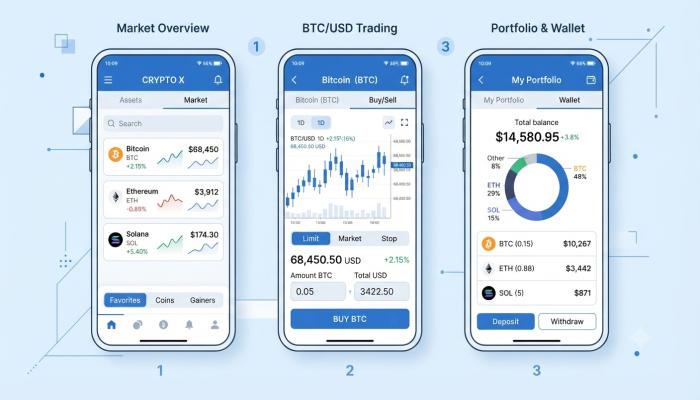
Quick Answer: A crypto app is a mobile or desktop application that lets you buy, sell, store, and track cryptocurrencies like Bitcoin and Ethereum. Most apps combine an exchange, wallet, and portfolio tracker in one place. Setup typically takes under 15 minutes.
Think of it as your bank + stock brokerage, but for digital assets. The best crypto apps handle everything: price charts, instant buy/sell orders, secure wallets, and transaction history — all from your phone.
There are three types you’ll encounter:
- Exchange apps (Binance, CoinDCX, WazirX) — for buying/selling crypto
- Wallet apps (Trust Wallet, MetaMask) — for storing and transferring crypto
- Portfolio tracker apps (CoinStats, Delta) — for monitoring your holdings across platforms
Most beginners should start with an exchange app that has a built-in wallet. It’s simpler and you don’t have to juggle two platforms.
Best Crypto App in 2025: How to Actually Choose One
Before you download anything, match the app to your situation. I’ve seen too many beginners download Binance (built for active traders) when they just want to buy ₹500 of Bitcoin once a week.
Here’s a simplified comparison:
| App | Best For | India Support | Free to Download | PC Version |
|---|---|---|---|---|
| CoinDCX | Indian beginners | ✅ Yes | ✅ Yes | ✅ Web |
| WazirX | INR deposits | ✅ Yes | ✅ Yes | ✅ Web |
| Binance | Advanced trading | ✅ Yes | ✅ Yes | ✅ Desktop |
| Coinbase | Simplicity | ⚠️ Limited | ✅ Yes | ✅ Web |
| Trust Wallet | Storing crypto | ✅ Yes | ✅ Yes | ✅ Extension |
Pro Tip: If you’re in India, go with CoinDCX or WazirX first. Both support UPI and IMPS deposits, have INR trading pairs, and comply with Indian regulations. Coinbase has limited INR support and higher fees for Indian users.
Is the Crypto App Free? Here’s the Honest Answer
Downloading any major crypto app is 100% free. There’s no subscription or upfront cost.
But here’s what most articles don’t tell you: free to download ≠ free to use.
Every app makes money through:
- Trading fees (0.1%–0.5% per transaction on most exchanges)
- Spread (the gap between buy and sell price — this is hidden)
- Withdrawal fees (charged when you move crypto off the platform)
- Network fees (also called “gas fees” — charged by the blockchain, not the app)
A practical example: If you buy ₹10,000 worth of Bitcoin on WazirX, you might pay ₹20–50 in trading fees. Small, but it adds up if you’re trading daily.
Crypto App Download for Android: Step-by-Step
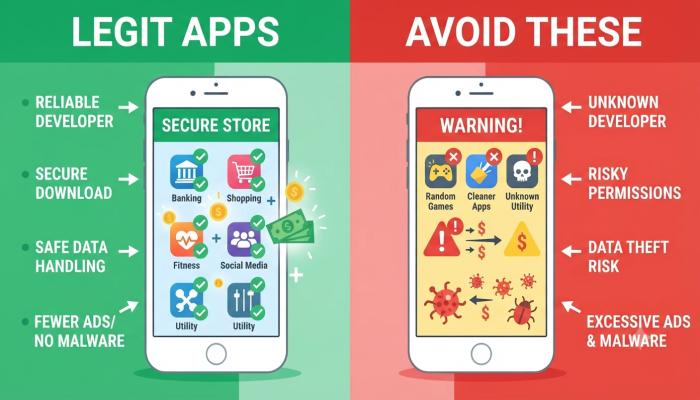
The safest way to get any crypto app on Android is through the Google Play Store. Sounds obvious, but phishing apps that mimic real ones are a real problem — I’ve personally seen friends lose money to fake Binance apps they found through Google Search ads.
Also Read: The Best Photo Editor for Beginners (Free, Online & App Options)
Steps:
- Open the Google Play Store on your Android device
- Search for the exact app name (e.g., “CoinDCX: Buy Bitcoin & Crypto”)
- Check the developer name and ratings (look for 1M+ downloads and 4+ stars)
- Tap Install and wait for the download to complete
- Open the app and tap Sign Up to create your account
Common Pitfall: Don’t download crypto apps from random websites or links in WhatsApp groups. Stick to official stores only.
Crypto App Download APK: Only When Necessary
An APK (Android Package Kit) is the raw app installer file. Some users need it when:
- The app isn’t available in their region’s Play Store
- They’re using an older Android version
- They prefer sideloading apps (advanced users only)
If you must download an APK:
- Go only to the official website of the app (e.g., binance.com/en/download)
- Enable “Install from Unknown Sources” in your Android settings temporarily
- Download the APK, install it, then turn off “Unknown Sources” again
- Verify the app version matches what’s listed on the official website
⚠️ Warning: Third-party APK sites (APKPure, APKMirror clones, Telegram channels) carry real risk. Malware embedded in fake crypto APKs can steal your seed phrase and drain your wallet before you even notice. This is not hypothetical — it’s one of the most common crypto scams in India right now.
Crypto App Download for PC: Your Options Explained
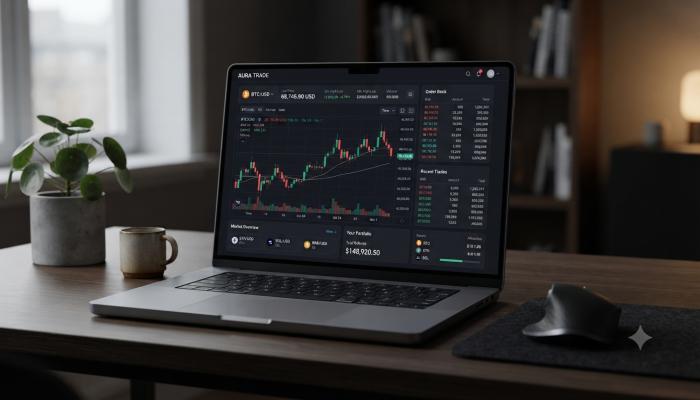
Most crypto exchanges don’t have a dedicated Windows or Mac desktop app — they’re browser-based platforms. Here’s what’s actually available:
- Binance Desktop App — Available for Windows and Mac at binance.com/en/download
- Coinbase Web Platform — Use it at coinbase.com; no download needed
- CoinDCX Web — Available at coindcx.com with full trading features
- MetaMask Browser Extension — Works in Chrome, Firefox, Edge for PC-based crypto wallet
For most beginners, the browser version works perfectly. The Binance desktop app is worth it only if you’re doing active, high-volume trading and need faster execution.
Crypto App Login: When It’s Not Working (And What to Do)
Login issues trip up more beginners than the trading itself. Here are the most common problems and their fixes:
“I forgot my password” → Use the “Forgot Password” link on the login screen. Check spam folder for the reset email.
“My 2FA code isn’t working” → Your phone’s clock might be out of sync. Go to Settings > Date & Time > Sync automatically.
“My account is locked after failed attempts” → Most apps lock for 24 hours after 5 failed tries. Wait it out, then reset your password.
“I can’t log in on a new device” → Check your email for a new device verification link. Some apps require this for security.
Pro Tip: Always set up 2FA (two-factor authentication) using an authenticator app like Google Authenticator — not SMS. SIM-swap scams can bypass SMS-based 2FA, and crypto accounts are a major target.
Crypto App in India: What You Need to Know First
India has specific regulations that affect how crypto apps work here:
- 1% TDS is deducted on every crypto sale above ₹10,000 per transaction (as of current rules)
- 30% flat tax applies to crypto gains with no deduction for losses
- KYC is mandatory — all regulated apps require Aadhaar + PAN verification
Apps like CoinDCX, WazirX, and ZebPay automatically handle TDS deduction and generate tax reports. This is a genuine advantage over foreign apps for Indian users — you don’t have to calculate it yourself.
Also Read: Best Train Tracking App to Check Live Running Status (2026 Guide)
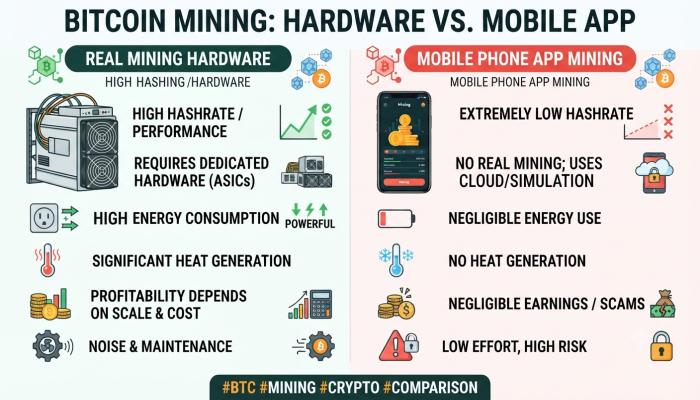
Crypto App Mining: What Beginners Actually Need to Know
You’ve probably seen apps claiming you can “mine crypto from your phone.” Let’s be straightforward about this.
Real crypto mining (like Bitcoin mining) requires specialized hardware (ASICs or GPUs) and consumes enormous electricity. Your phone cannot do it profitably — ever.
What these “mining apps” actually do:
- Cloud mining apps: You rent mining power from a data center. Returns are usually poor and many are scams.
- Tap-to-earn apps: Games like Hamster Kombat or Pi Network use the word “mining” loosely. They give you tokens for engagement, but most have little to no real-world value.
- Legitimate staking apps: Some apps let you “stake” your crypto to earn rewards (like interest). This is different from mining but is a real way to earn passively.
If an app promises high daily returns just for leaving it running on your phone — it’s a scam.
Semantic FAQ: People Also Ask
Q1: Which crypto app is best for beginners in India? CoinDCX and WazirX are the most beginner-friendly for Indian users. Both support UPI/IMPS deposits, have INR trading pairs, and are registered with India’s FIU. Start with CoinDCX if you want a simpler interface.
Q2: Is it safe to download a crypto app? Yes — if you download from the official app store (Google Play or Apple App Store) or the exchange’s official website. Never download from third-party links, social media DMs, or unofficial APK sites.
Q3: Can I use a crypto app without KYC? Regulated Indian exchanges require KYC to deposit/withdraw INR. Some international wallets (like Trust Wallet) don’t require KYC, but they don’t support INR deposits either.
Q4: Does a crypto app work on PC without downloading anything? Yes. Most major exchanges (Binance, CoinDCX, WazirX, Coinbase) have fully functional web platforms. Just visit their official website and log in from any browser.
Q5: What’s the minimum amount to start on a crypto app? Most Indian exchanges allow you to start with as little as ₹100. Binance has a minimum order size that varies by coin, but generally starts around $5–10 equivalent.
Q6: Are crypto apps regulated in India? Yes — exchanges registered with India’s Financial Intelligence Unit (FIU-IND) are compliant. Always check if an exchange is FIU-registered before depositing money.
Q7: Can I lose money using a crypto app? Yes. Crypto prices are highly volatile, and there’s no guarantee of returns. Only invest what you can afford to lose completely. A crypto app is a tool — the risk comes from the market, not the app itself.
Your Next Step Checklist (Don’t Just Read — Do This)
Most people read a guide like this and do nothing. Here’s a 15-minute action plan to actually get started:
- [ ] Pick one app based on your situation (India beginner? Start with CoinDCX)
- [ ] Download it from the official store — Google Play, App Store, or official website only
- [ ] Create your account with a strong, unique password
- [ ] Complete KYC — have your Aadhaar and PAN card ready
- [ ] Enable 2FA using Google Authenticator (not SMS)
- [ ] Deposit a small amount (₹500–₹1000) just to learn the interface
- [ ] Buy a small amount of a major coin (Bitcoin or Ethereum) to experience your first transaction
- [ ] Screenshot or note your login details and store them somewhere offline and secure