RuPay Card Explained: Benefits, How to Apply, Limits & Lounge Access (2026 Guide)


You finally get a new bank account, the relationship manager slides a debit card across the counter, and it says “RuPay” on it. You didn’t ask for Visa or Mastercard — so what exactly did you get? Is this card any good?
Short answer: yes, often better than you’d expect. But there’s a version of the RuPay card that suits daily use and another that gets you into airport lounges. Knowing which one you have — and how to use it — makes all the difference.
This guide breaks everything down for first-timers.
What Is a RuPay Card, and Why Does It Matter?
RuPay is India’s own card payment network, built and operated by the National Payments Corporation of India (NPCI). Think of it the way you’d think of Visa or Mastercard — it’s the network that processes your transactions — except RuPay is entirely domestic, which means lower processing costs and no foreign currency conversion fees on Indian transactions.
Here’s what makes RuPay stand out for Indian users:
- Transactions stay within India’s financial infrastructure, making them faster and cheaper to process.
- Most Jan Dhan accounts, post office savings accounts, and Kisan Credit Cards are issued on RuPay by default.
- RuPay is the only card network fully integrated with UPI — meaning you can link your RuPay credit card directly to PhonePe, Google Pay, or BHIM for UPI payments.
- RuPay Global cards (with Discover, Diners, or Pulse logos) are accepted in 200+ countries at 4.24 million+ POS terminals.
I’ve spoken to dozens of first-time cardholders who assumed RuPay was “lesser” because it’s not Visa. That’s a myth. For most everyday Indian spending, RuPay is equally capable — and cheaper for the bank, which sometimes means more perks passed to you.
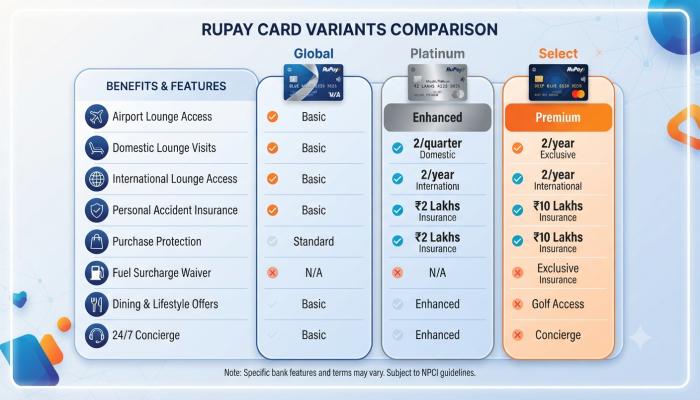
Types of RuPay Cards: Which One Do You Have?
| Card Variant | Best For | Lounge Access | International Use |
|---|---|---|---|
| RuPay Classic | Basic everyday use | ❌ | ❌ |
| RuPay Platinum Debit | Regular spenders | ✅ (till Mar 2026)* | Limited |
| RuPay Select Debit | Premium banking | ✅ (spend-based) | ✅ |
| RuPay Global (Credit) | Travel + big purchases | ✅ (tier-based) | ✅ |
⚠️ Important Update (April 2026): NPCI has discontinued complimentary lounge access for RuPay Platinum debit cardholders from April 1, 2026. Lounge access continues for RuPay Select debit cards and credit card variants, subject to quarterly spend eligibility. Check with your bank for the latest terms.
Also Read: BGMI Name Style: The Ultimate Guide to Cool, Unique IGNs (2024)
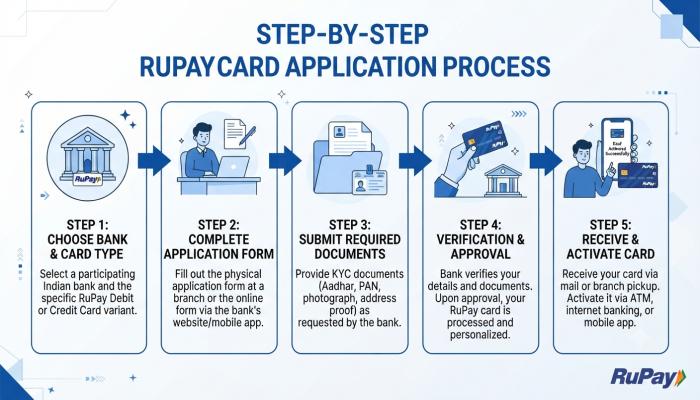
How to Apply for a RuPay Card
Getting a RuPay card isn’t complicated — but the process differs slightly between debit and credit cards.
For a RuPay Debit Card:
- Open a savings or current account at any participating bank (most public sector banks issue RuPay by default).
- If you already have an account, visit your branch or log in to net banking.
- Request a RuPay debit card variant — Platinum or Select — if your account tier qualifies.
- Your card will arrive by post within 7–10 working days, or you can pick it up at the branch in some cases.
For a RuPay Credit Card:
- Check eligibility on your bank’s website (income proof, credit score of 700+ is generally preferred).
- Apply online via the bank’s portal, or visit the nearest branch.
- Submit documents: PAN card, Aadhaar, income proof (salary slips or ITR), and a passport-size photo.
- Approval typically takes 7–15 working days.
Pro Tip: If you’re applying specifically for UPI-on-credit-card benefits, confirm that your issuing bank supports RuPay credit card linking on UPI. As of now, 16+ banks are live on this feature, including HDFC, SBI Cards, ICICI, Axis, and Kotak Mahindra Bank.
RuPay Card Registration and Login: Getting Started
Once your card arrives, here’s what to do:
Activate Your Card: Most banks let you activate online via net banking, their mobile app, or at an ATM (by doing your first PIN-based transaction).
Register for Net Banking:
- Visit your bank’s official website.
- Look for “Register for Internet Banking” or “New User Registration.“
- Enter your account number, registered mobile number, and card details.
- Set a username and password.
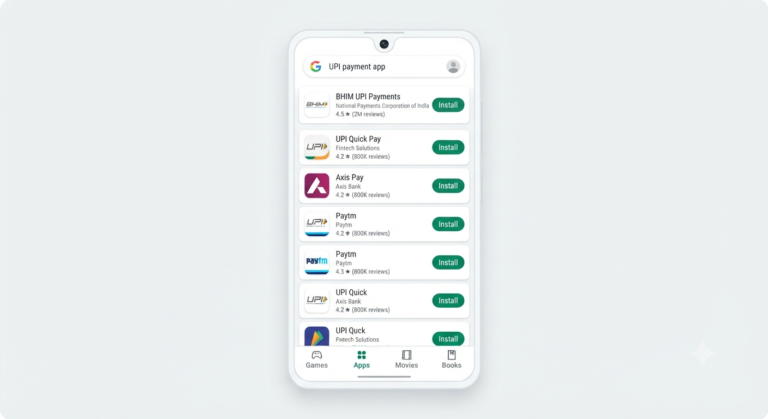
Link to UPI: Open BHIM, PhonePe, or Google Pay → go to “Add Payment Method” → select “Credit Card” → choose RuPay → select your bank → verify with OTP → set UPI PIN using your card’s expiry date and CVV.
Common Mistake I See All the Time: People try to link their RuPay debit card to UPI for credit card benefits. That’s not how it works — only RuPay credit cards get the UPI-on-credit-card feature. Debit cards link normally via your bank account.
Also Read: PAN Aadhaar Link Status: How to Check It Online in 2 Minutes (2026 Guide)
RuPay Card Transaction Limits: What You Need to Know
Transaction limits depend on your card variant and issuing bank, but here are the broad figures to know:
RuPay Debit Card (Daily Limits):
- ATM Cash Withdrawal: ₹25,000–₹1,00,000 (varies by bank and card tier)
- POS / Online Shopping: ₹1,00,000–₹2,00,000
- Contactless Transactions: Up to ₹5,000 per tap without PIN (mandatory PIN above ₹5,000)
- Contactless transactions per day: Capped at 3 taps
RuPay Credit Card on UPI (Transaction Limits):
- First 24 hours after linking: ₹5,000/day (security cap)
- After 24 hours: Standard UPI app limits apply (typically ₹1 lakh/day for most apps)
- Monthly cap: Set by your issuing bank; check your card agreement
- P2P (person-to-person) transfers via UPI on credit cards: Generally not allowed — this feature is primarily for merchant payments
⚠️ Pitfall: Your usable UPI limit is the lower of two values — the UPI app’s cap and your available credit card limit. So if your card has ₹30,000 available credit, you can’t spend more than that via UPI even if the app allows ₹1 lakh.
RuPay Card Lounge Access: The Real Picture
This is where things get nuanced — especially after the 2025–2026 rule changes.
For RuPay Credit Cards (Select, Platinum & higher variants):
NPCI introduced a tier-based system effective January 1, 2025, for the exclusive RuPay Lounge at IGI Airport Terminal 3, Delhi:
| Tier | Quarterly Spend | Complimentary Visits |
|---|---|---|
| Tier I | ₹10,000–₹50,000 | 2 visits |
| Tier II | ₹50,001–₹1,00,000 | 4 visits |
| Tier III | ₹1,00,001–₹5,00,000 | 8 visits |
| Tier IV | Above ₹5,00,000 | Unlimited |
Unused visits reset to zero at the end of each calendar quarter — they don’t carry over.
For RuPay Select Debit Cards: Lounge access continues, but is spend-based. For example, the SBI Wealth RuPay Select Debit Card offers 4 domestic lounge visits per quarter and 2 international visits per year.
For RuPay Platinum Debit Cards: Complimentary lounge access has been discontinued from April 1, 2026, per NPCI’s revised guidelines. Some banks may offer it as a customised benefit — confirm directly with your bank.
Pro Tip: The exclusive RuPay Lounge at IGI Airport T3 (Departure Pier 11, near Gate 41) is different from standard Visa/Mastercard-accessed lounges. It offers its own food, drinks, and entertainment. If you’re a frequent domestic flyer from Delhi, a RuPay Select or higher credit card that keeps you in Tier II or above is genuinely worth the math.
Frequently Asked Questions About RuPay Cards
1. Can I use a RuPay card internationally?
Yes, but only if it’s a RuPay Global card with the Discover, Diners Club, or Pulse network logo. Standard RuPay Classic and Platinum debit cards are domestic-only. RuPay Global cards are accepted at 4.24 million+ POS terminals across 200+ countries.
2. Is RuPay card accepted on all online platforms in India?
Almost all major Indian platforms accept RuPay. Some international payment gateways (like certain foreign subscription services) may not, as they require Visa or Mastercard. For Indian platforms — Flipkart, Amazon India, Zomato, IRCTC — RuPay works without issues.
3. How do I check my RuPay card’s transaction limit?
Log in to your bank’s mobile app or net banking portal, navigate to the “Cards” section, and look for “Card Limits” or “Daily Limits.” You can also call your bank’s customer care. For UPI-linked credit cards, open your UPI app, go to “Linked Accounts,” select your card, and check the limit settings.
4. What is RuPay Select Debit Card, and who should get it?
RuPay Select is the premium debit card tier. It includes airport lounge access (spend-based), golf lessons, complimentary spa sessions, gym memberships, and higher transaction limits. It’s typically offered to premium savings account holders or wealth banking customers. If you’re spending ₹50,000+ a month on your debit card, Select perks often justify the premium account fees.
5. Can I convert my RuPay card to Visa or Mastercard?
Yes. Contact your bank and request a card upgrade. However, your existing RuPay card will be blocked, and you’ll receive a new Visa or Mastercard. Worth noting: you’d lose UPI-on-credit-card capability, which is exclusive to RuPay.
6. Why was my lounge access denied even though I have a RuPay Platinum card?
From April 1, 2026, NPCI has removed complimentary lounge access from standard RuPay Platinum debit cards. Your access may have been valid until March 31, 2026. Verify your card type with your bank — if it’s a customised Premium variant, your bank may still offer it separately.
7. Is there a fee to apply for a RuPay card?
RuPay itself doesn’t charge an issuance fee — but your bank might. The annual fee, if any, is set by the issuing bank, not NPCI. Many public sector bank RuPay debit cards are free with a zero-balance or Jan Dhan account.
Your Next Step Checklist
You don’t need to do everything at once. Here’s a simple action sequence:
- [ ] Identify your card type — Check the back of your card for “Classic,” “Platinum,” “Select,” or a Discover/Diners logo (Global).
- [ ] Activate your card — Via ATM, net banking, or your bank’s app.
- [ ] Set up net banking login — You’ll need this to check limits, block/unblock your card, and manage settings.
- [ ] Link to a UPI app — If you have a RuPay credit card, link it to BHIM, PhonePe, or GPay for seamless UPI payments.
- [ ] Check your lounge access eligibility — Call your bank or check their app to confirm if your card qualifies post-April 2026.
- [ ] Track your quarterly spends — If lounge access is important to you, monitor spending through your bank app to stay in the right tier.