Jio Broadband Complete Guide 2026: Plans, Booking, AirFiber & Everything You Need to Know

Hook Introduction
Your internet keeps dropping. The Netflix buffer wheel is spinning again. Your neighbour casually mentions they switched to Jio broadband and haven’t had a problem since.
Sound familiar?
Whether you’re tired of sluggish DSL speeds or just moved into a new home and have no idea where to start — Jio broadband is probably already on your radar. The problem? The moment you land on Jio’s website, you’re hit with three different products: JioFiber, Jio AirFiber, and a menu of plans that look nearly identical.
This guide cuts through all of that. By the end, you’ll know exactly which Jio broadband connection is right for your home, how to book it in under 10 minutes, what to do when something goes wrong, and a few things nobody tells you before you sign up.
Why Jio Broadband Matters Right Now
India crossed 900 million internet users in 2025. More people are working from home, streaming in 4K, and running smart home devices simultaneously. A weak broadband connection isn’t just annoying anymore — it’s a real productivity problem.
Jio broadband (under the brand name JioFiber and Jio AirFiber) has become one of the most widely searched home internet options in India. The reasons are straightforward: competitive pricing, bundled OTT apps, and aggressive expansion into smaller cities. If you’re a first-time broadband buyer, it’s one of the most beginner-friendly options available.
What Is Jio Broadband? (JioFiber vs. Jio AirFiber Explained)
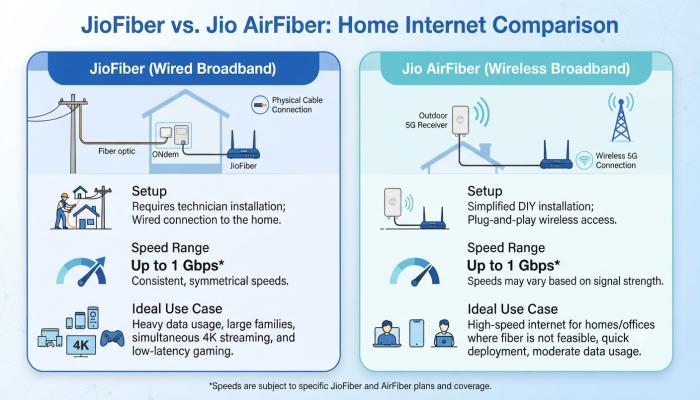
Quick Answer (Featured Snippet): Jio broadband refers to two home internet services by Reliance Jio — JioFiber (a wired fiber-optic connection using underground cables) and Jio AirFiber (a wireless 5G-powered connection using an outdoor unit installed at your home). Both offer unlimited data, bundled OTT apps, and speeds up to 1 Gbps.
JioFiber — The Wired Connection
JioFiber runs an optical fiber cable directly to your home. An ONT (Optical Network Terminal) device is installed, and a WiFi router connects all your devices to it. It’s stable, fast, and best suited for homes in apartments or housing societies where Jio has already laid fiber infrastructure.
Speed range: 30 Mbps to 1 Gbps
Best for: Families, WFH setups, heavy streaming and gaming
Also Read: Voter ID Card: How to Apply Online, Download & Check Your Name in the Voter List (2026 Guide)
Jio AirFiber — The Wireless 5G Alternative
<a href=”https://www.cashify.in/jio-air-fiber-plans-offers-benefits-details” rel=”noopener”>Jio AirFiber</a> is a wireless broadband service that delivers internet without underground cables. It uses an Outdoor Unit (ODU) and an Indoor Unit (IDU) to connect your home directly to the nearest Jio 5G tower. No messy cabling, plug-and-play setup, and it works even during bad weather. Plans start at ₹599/month and it can support 10–20 devices simultaneously.
Speed range: 30 Mbps to 1 Gbps
Best for: Areas without fiber coverage, rented homes, quick setup needs
⚠️ Common Pitfall: Many people assume AirFiber is automatically available everywhere. It isn’t. AirFiber requires Jio 5G coverage at your address. Before assuming it’ll work, check availability in the MyJio app first.
Jio Broadband Plans in 2026: What You’re Actually Paying For
Here’s a simplified breakdown of current JioFiber and AirFiber plans. Always verify on jio.com as prices can change.
JioFiber Plan Comparison Table
| Plan (₹/month) | Speed | Key OTT Apps Included |
|---|---|---|
| ₹399 | Up to 30 Mbps | JioHotstar, ZEE5, Sony Liv, Amazon Prime Lite, and 10+ more |
| ₹699 | Up to 100 Mbps | All above + YouTube Premium |
| ₹999 | Up to 150 Mbps | All above + Netflix Basic |
| ₹1,499 | Up to 300 Mbps | All above + Netflix Standard |
| ₹2,499 | Up to 1 Gbps | All above + Premium OTT bundle |
All plans include: Unlimited data, unlimited calling, and access to bundled OTT subscriptions.
Jio AirFiber Plan Comparison Table
| Plan (₹/month) | Speed | Highlights |
|---|---|---|
| ₹599 | Up to 30 Mbps | 13+ OTT apps, WiFi 6 router + Set-top box |
| ₹999 | Up to 100 Mbps | 16 OTT apps + 800+ TV channels |
| ₹1,499 | Up to 500 Mbps | All OTT + 4K Set-top box |
| ₹2,499 | Up to 1 Gbps | Full premium bundle |
Pro-Tip 💡: I’ve noticed that most beginners overbuy on speed and underbuy on value. If your household has 2–4 people doing regular streaming and video calls, the ₹699–₹999 JioFiber tier is genuinely the sweet spot. You don’t need 1 Gbps unless you’re running a home server or doing large file transfers daily.
How to Book a Jio Fiber New Connection (Step-by-Step)
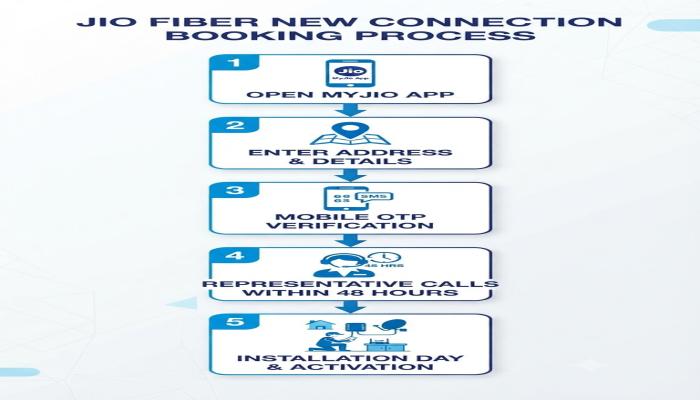
Booking is faster than most people expect. Here’s the exact process:
Via the MyJio App (Recommended)
- Download the MyJio app from the Play Store or App Store.
- Open the app → Tap “Get JioFiber” or navigate to the JioHome section.
- Enter your name, mobile number, and installation address.
- Complete OTP verification on your registered mobile number.
- Submit the form.
A Jio representative will typically call you within 24–48 hours to schedule the installation and confirm documents (Aadhaar/ID proof is standard).
Via the Website
- Visit jio.com → Go to JioFiber or JioHome section.
- Enter your name, mobile number → Click Generate OTP.
- Verify OTP → Add your installation address (use the location pin for accuracy).
- Select Home or Office → Submit.
⚠️ Common Pitfall: Some users report paying upfront and then not receiving installation. Don’t pay until a Jio representative confirms your address is serviceable. Check feasibility first using the address pin on the app.
Jio Broadband Recharge: How It Works
Recharging your Jio WiFi or JioFiber account is straightforward:
- MyJio App → Go to “Pay Bill” or “Recharge” → Select JioFiber → Choose plan → Pay via UPI, debit/credit card, or net banking.
- Jio Website → Log in → Billing section → Pay bill.
- WhatsApp → Send “Hi” to 70005 70005 to check balance and pay bills.
- Third-party apps → PhonePe, Google Pay, and Paytm all support JioFiber recharge under the broadband/bill payment section.
Plans are monthly postpaid or can be paid for 3, 6, or 12 months in advance (annual plans often get installation fee waivers).
Jio Broadband Customer Care: How to Actually Get Help
Here’s where things get real. Customer service is the most complained-about aspect of JioFiber. Here’s how to navigate it efficiently.
Primary contact numbers:
- 1800-896-9999 — Toll-free, 24×7, for JioFiber and AirFiber support
- 198 — Dial from your Jio mobile number
- WhatsApp Support: 70005 70005 — Best for quick queries, billing, and router troubleshooting
Built-in diagnostic tool (underused): Open MyJio → Tap Fiber/Home → Select JioCare → Run Diagnostics. Jio’s automated system now resolves roughly 80% of connectivity issues without a support call. Try this first.
Escalation path if your issue isn’t resolved in 48 hours:
- Level 1: Call 1800-896-9999 or 198
- Level 2: Raise a complaint with the Jio Appellate Authority at 1800-889-3999
Pro-Tip 💡: When you call support, always note down the Service Request (SR) number given to you. Without it, follow-up calls start from scratch. Screenshot it or save it in your phone notes immediately.

Semantic FAQ: People Also Ask
Q1. What is the difference between Jio WiFi and JioFiber?
“Jio WiFi” is an informal term people use for JioFiber’s home WiFi connection. JioFiber is the official product — it’s a wired fiber broadband connection that creates a WiFi network inside your home via a Jio router. There is no separate product called “Jio WiFi.”
Q2. What documents are needed for Jio fiber new connection?
You typically need a government-issued photo ID (Aadhaar card is most commonly used) and your mobile number. The exact list is confirmed by the Jio representative when they call to schedule installation.
Q3. Is Jio AirFiber available everywhere in India?
No. Jio AirFiber requires active Jio 5G coverage at your specific address. You can check availability by entering your address in the MyJio app under the JioHome or AirFiber section.
Q4. How long does Jio fiber installation take after booking?
After booking, a Jio representative typically calls within 24–48 hours. Actual installation usually happens within 3–7 business days depending on your city and demand. Urban metro areas tend to be faster.
Q5. Can I recharge Jio broadband without the MyJio app?
Yes. You can recharge via the Jio website, Google Pay, Paytm, PhonePe, or by WhatsApp messaging 70005 70005. The MyJio app is simply the most convenient option.
Q6. What is the cheapest Jio broadband plan in 2026?
JioFiber’s entry plan starts at ₹399/month with up to 30 Mbps speed and includes multiple OTT subscriptions. Jio AirFiber starts at ₹599/month. Both include unlimited data.
Q7. What should I do if my Jio router shows a red blinking light?
A red blinking light signals a signal or fiber connectivity issue. Restart the router and ONT device, check that all cables are secure, then use the MyJio app’s “Run Diagnostics” feature. If the issue persists, raise a technician request through JioCare.
Your Next-Step Checklist (Actionable Conclusion)
You now have everything you need to make a smart decision. Here’s what to do next — in order:
- [ ] Check availability — Open the MyJio app and enter your address to confirm JioFiber or AirFiber is serviceable at your location.
- [ ] Pick your plan — For 1–2 users: ₹399–₹699. For families or WFH: ₹999–₹1,499. For power users: ₹2,499.
- [ ] Book the connection — Use the MyJio app or jio.com. Don’t pay until a rep confirms your address is feasible.
- [ ] Keep your SR number — Once installed, if any issue arises, call 1800-896-9999 and always ask for a Service Request number.
- [ ] Try the diagnostics tool first — Before calling support, run the in-app diagnostics. It fixes 8 out of 10 issues faster than a phone call.
Ready to get started? Visit jio.com or open the MyJio app to check availability at your address and book your Jio fiber connection today.