BGMI Name Style: The Ultimate Guide to Cool, Unique IGNs (2024)

Introduction
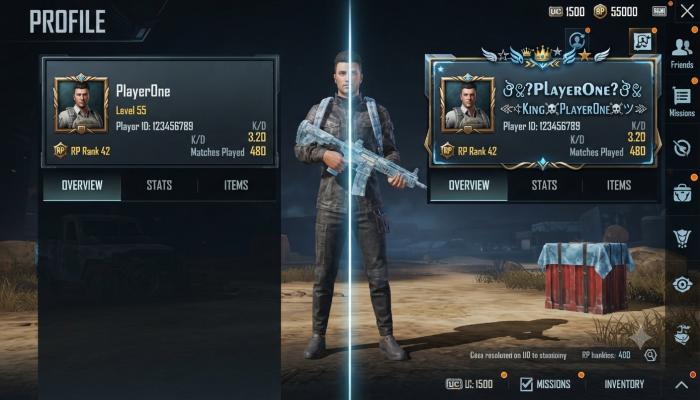
Your BGMI username is the first thing people see when you frag them. And nothing kills the vibe faster than a plain, boring name while your squad is rocking glowing symbols and gradient-style fonts.
I’ve seen hundreds of players frustrated — they copy a cool name from YouTube, paste it into BGMI, and get a jumbled mess of question marks. The font breaks. The symbols don’t load. It feels like the game is trolling you.
This guide fixes that. You’ll get working copy-paste name styles, step-by-step instructions for changing your name, special tips for girl players, and answers to the most common name-change problems people run into after the BGMI 4.2 update.
Why Your BGMI Name Style Actually Matters
A stylish name isn’t just vanity — it signals that you take the game seriously. In BGMI, your IGN (In-Game Name) appears:
- On the kill feed (where enemies and teammates see it)
- On your profile card during lobby
- In squad leaderboards and clan tags
- On the post-match results screen
Players with clean, stylized names are more likely to receive friend requests, get noticed in competitive lobbies, and build a recognizable identity — especially on platforms like YouTube or Instagram where content creators share their gameplay.
What Is BGMI Name Style?
BGMI name style refers to the use of Unicode fonts, special symbols, decorative characters, and aesthetic text formatting to make your in-game name visually unique. Instead of standard English letters, players use stylized alternatives — like ꧁𝕯𝖆𝖗𝖐𝕷𝖔𝖗𝖉꧂ — that render inside the BGMI name field.
These aren’t regular fonts. They’re Unicode characters that look like styled letters but are technically different characters entirely — which is why they work in a plain text field inside the game.
Best BGMI Name Style Ideas (Copy-Paste Ready)
Here are working name styles tested across Android, iOS, and PC versions of BGMI. These hold up after the 4.2 update.
Also Read: PAN Aadhaar Link Status: How to Check It Online in 2 Minutes (2026 Guide)
Classic Aesthetic Names
꧁༺ ℛaɴɢeR ༻꧂
★彡[ᴮᴬᴰᴮᴼʏ]彡★
꧁𝓓𝓪𝓻𝓴𝓚𝓲𝓷𝓰꧂
『ꜰɪʀᴇ』★Sᴛᴏʀᴍ★
Clan-Style Names (with brackets)
【ᴳᵒᵈ】ᴷᴵᴸᴸᴱᴿ
《SQUAD》ᴮᴼˢˢ
[ᴾᴿᴼ]Sɴɪᴘᴇʀ✓
〖𝔻𝕒𝕣𝕜〗𝕊𝕠𝕦𝕝
Minimal Clean Names
ᴀʙʏss
Sʜᴀᴅᴏᴡ·
ɴɪɢʜᴛ꙰
ᴠᴏɪᴅ²
🛡️ Pro Tip: Shorter names with 1–2 symbols render more cleanly on mobile kill feeds. Names over 14 characters often get cut off. Keep it punchy.
BGMI Name Style for Girls — Aesthetic & Cute Ideas
Girl players often want something that balances personality with edge. Here are name styles that have been popular in the Indian BGMI community:
Cute Aesthetic
꧁✿𝓢𝓪𝓴𝓾𝓻𝓪✿꧂
•ᴴᵉᵃʳᵗ𝓠𝓾𝓮𝓮𝓷•
꧁🌸𝓢𝓸𝓯𝓲𝓪🌸꧂
ʙᴀʙʏ·ǫᴜᴇᴇɴ✨
Bold & Fierce
꧁𝕰𝖒𝖕𝖗𝖊𝖘𝖘꧂
[ꜰɪʀᴇ]ǫᴜᴇᴇɴ🔥
★𝓓𝓮𝓿𝓲𝓵𝓖𝓲𝓻𝓵★
ᴋɪʟʟᴇʀ·ᴋɪᴛᴛʏ⚡
Simple & Classy
ᴇʟɪᴛᴇ·ǫᴜᴇᴇɴ
𝓜𝓪𝔂𝓪
ꜱᴏᴜʟ·ɢɪʀʟ
ɴᴇᴏɴ·ʀᴏꜱᴇ

How to Change Your BGMI Name Style — Step by Step
What you’ll need: Your BGMI account, a Rename Card (or UC to purchase one), and a copy-paste source (this article works).
- Open BGMI and tap your profile avatar in the top-left corner.
- Tap the pencil/edit icon next to your current name.
- Clear the existing name completely.
- Go to a font generator site like LingoJam or use the names above.
- Copy the stylized name you want.
- Paste it into the BGMI name field.
- Tap “OK” or “Confirm” — the game will ask you to use a Rename Card.
- Confirm, and your new name goes live instantly.
⚠️ Common Pitfall: If your name shows as blank boxes (□□□) after saving, the font uses characters not supported by BGMI’s engine. Stick to the names in this guide — they’ve been tested and confirmed working.
BGMI 4.2 Update — What Changed for Names?
The BGMI 4.2 update (available for Android and iOS download) brought a few UI tweaks that affect name display:
- Kill feed font rendering was slightly adjusted — some older symbol-heavy names now display differently on opponent screens.
- The name character limit remains at 14 characters (symbols count as characters).
- Players on BGMI iOS update versions reported that certain left-right bracket symbols (like ꧁꧂) now render more cleanly than before.
- If you’re on BGMI PC via emulator (BlueStacks or GameLoop), copy-paste works the same way — no difference in name styling support.
🛡️ Pro Tip: After updating to 4.2, do a test: change to a free in-game name first (if available) to confirm your style renders correctly before spending a Rename Card.
BGMI APK — Name Style After Manual Install
Some players download the BGMI APK directly (especially during App Store delays or regional rollouts). If you’re on an APK version:
- Name styling works identically to the Play Store version.
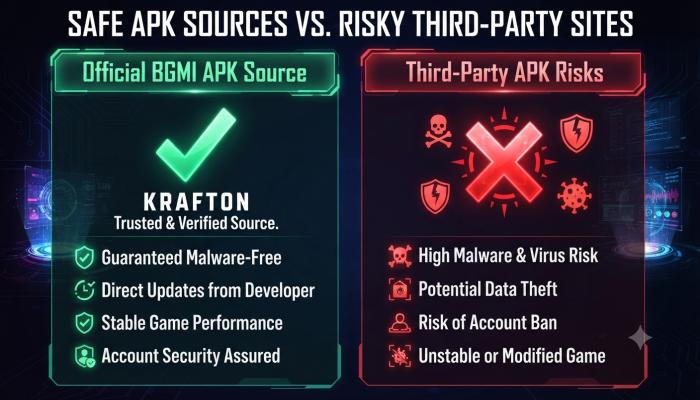
- If you get a “BGMI APK rejected” or “version mismatch” error at login, your APK is outdated. Download the latest official version from Krafton’s official site — this is the only safe source.
- Never download APKs from third-party sites. Account bans from tampered APKs are permanent and Krafton does not reverse them.
BGMI Name Style on PC — Does It Work?
Yes — if you’re playing BGMI on PC via an Android emulator like BlueStacks or LDPlayer, name styling works exactly the same. Here’s the one difference: pasting Unicode characters is easier on PC since you can copy from a browser and paste with Ctrl+V directly into the name field inside the emulator.
Some PC players also use the Windows Character Map (search “charmap” in Start) to browse and copy individual Unicode symbols to build custom names character by character.
Comparison: Name Style Methods
| Method | Ease of Use | Symbol Variety | Works on iOS? | Works on PC? |
|---|---|---|---|---|
| Copy-paste from guide | ⭐⭐⭐⭐⭐ | Medium | ✅ | ✅ |
| Font generator website | ⭐⭐⭐⭐ | High | ✅ | ✅ |
| Windows Character Map | ⭐⭐ | Very High | ✅ | ✅ |
| Typing manually | ⭐ | Low | ✅ | ✅ |
Semantic FAQ — People Also Ask
Q: What is the best BGMI name style for a pro player? Short names with 1–2 Unicode symbols and small-caps fonts work best for pro players. They’re readable on the kill feed and look clean in clan tags. Examples: ᴀʙʏss· or [ᴾᴿᴼ]Sɴɪᴘᴇʀ.
Q: How do I get a stylish BGMI name for girls? Use a Unicode text generator or copy directly from the girl name section above. Paste it into the BGMI name field during a rename. Names like ꧁✿𝓢𝓪𝓴𝓾𝓻𝓪✿꧂ work on all devices including iOS.
Q: Why does my BGMI name show blank boxes after I change it? The font you used contains characters BGMI doesn’t support. Stick to widely compatible Unicode ranges — the names in this guide are pre-tested.
Q: Does BGMI name style work after the 4.2 update? Yes. The 4.2 update didn’t change name rendering for standard Unicode fonts. Rename Cards still work the same way.
Q: Can I use emoji in my BGMI name? Standard emoji (like 🔥 or ⭐) are supported in BGMI names, but some complex emoji may render as blank boxes on certain devices. Test before spending a Rename Card.
Q: How do I change my name in BGMI on iOS? The process is identical to Android: Profile → Edit name → Paste stylized name → Confirm with Rename Card. The BGMI iOS update hasn’t changed this flow.
Q: Is it safe to download BGMI APK from third-party sites? No. Third-party APKs carry a risk of account bans and device security issues. Only download from the official Krafton website or the Google Play Store.
Your Next-Step Checklist
Don’t just read this and close the tab. Here’s what to actually do next:
- [ ] Pick a name style from this guide that matches your personality
- [ ] Paste it into a notes app first to confirm it renders correctly on your device
- [ ] Check your Rename Card balance in BGMI (Inventory → Coupons)
- [ ] If you’re on the BGMI 4.2 update, confirm your app version before renaming
- [ ] After renaming, screenshot your profile and share it with your squad