Voter ID Card: How to Apply Online, Download & Check Your Name in the Voter List (2026 Guide)

You searched for your name in the voter list before the last election — and it wasn’t there. That panic is real, and it’s more common than you’d think. The good news? Every step — from applying for a new Voter ID to downloading your Voter ID card as a PDF with photo — can now be done entirely online in under 15 minutes.
This guide walks you through everything, step by step, with zero assumptions about what you already know.
What Is a Voter ID Card? (And Why You Actually Need It)
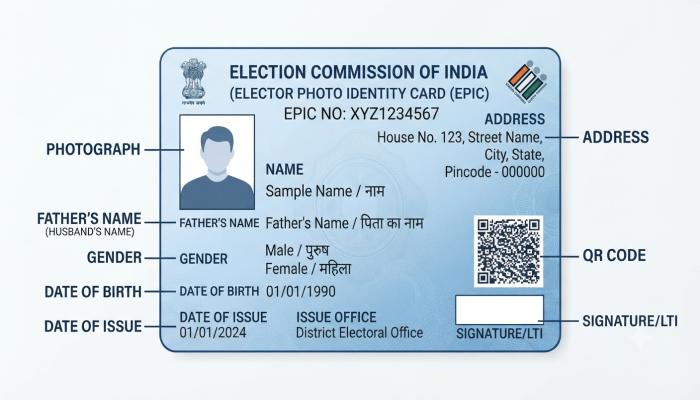
Quick Definition (Featured Snippet Target): A Voter ID card — officially called the EPIC (Electors Photo Identity Card) — is a government-issued photo identity document issued by the Election Commission of India. It serves two purposes: it’s your legal proof to vote in elections, and it’s a valid photo ID for everyday use like opening bank accounts or booking train tickets.
Here’s why it matters beyond just voting:
- Accepted as valid photo ID at banks, post offices, and government offices
- Required at polling booths during state and national elections
- Proof of address for many administrative processes
- Linked to your entry in the national electoral roll
I’ve seen many people assume their Aadhaar card is enough to vote. It isn’t, at least not at all polling booths. Your name must appear on the voter list, and having your EPIC card makes the process frictionless.
Also Read: Ayushman Card Apply Online 2026: Step-by-Step Guide to Get Your Free Health Cover
How to Apply for a Voter ID Online (New Registration — Form 6)
This is for first-time applicants — people who have never registered as a voter before.
What you’ll need before you start:
- Aadhaar card number (or any valid address proof)
- Passport-sized photo (JPG, under 2MB)
- Proof of age (birth certificate, school certificate, or Aadhaar)
- Mobile number linked to Aadhaar (for OTP)
Step-by-Step: Voter ID Card Online Apply via Voter Portal
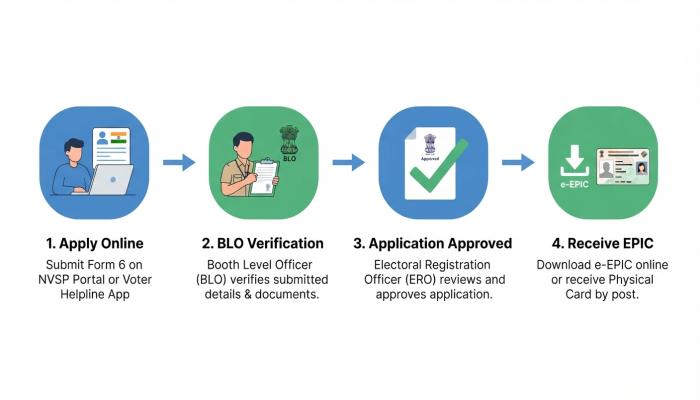
- Go to the official Voter Portal → voters.eci.gov.in
- Click “Register as New Voter” — this opens Form 6, the standard new voter registration form.
- Enter your mobile number and verify with OTP.
- Fill in your personal details: name, date of birth, gender, and current address.
- Upload your documents: photo, age proof, and address proof.
- Submit the form. You’ll receive an application reference number via SMS.
- A Booth Level Officer (BLO) may visit your address for physical verification within 30 days.
⚠️ Common Pitfall: Many applicants upload a photo that’s too large or in the wrong format. The portal accepts JPG files only, and the file size must be under 2MB. Resize before uploading — the form will silently reject oversized files with a generic error that doesn’t explain the reason.
How to Check Your Name in the Voter List
Before applying, always check if you’re already registered. Duplicate applications cause delays.
Voter ID search by name — 3 ways:
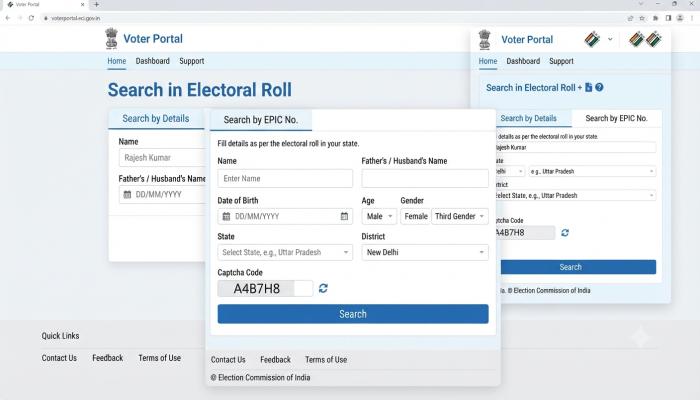
Method 1: Search by Name on the Voter Portal
- Visit voters.eci.gov.in
- Click “Search in Electoral Roll”
- Enter your name, state, and district
- A list of matching entries appears — check the details carefully
Method 2: Search by EPIC Number
If you already have an old Voter ID card, enter the EPIC number directly. This is faster and more accurate.
Method 3: National Voter Helpline App
Download the Voter Helpline App (available on Android and iOS). It lets you search your name offline after the initial data download.
💡 Pro-Tip (Information Gain): If your name appears but the details are wrong — a misspelled name, wrong address, or wrong date of birth — you do not need to reapply. Use Form 8 on the portal to correct existing entries. Most guides skip this, and people end up filing a new application unnecessarily, which creates duplicate records and slows down your actual update.
How to Download Your Voter ID Card as a PDF (With Photo)
Once registered, you don’t need to wait for the physical card. You can download a digital Voter ID — officially called the e-EPIC — directly from the Voter Portal. This is a valid, legally accepted document.
Steps to Download Voter ID PDF with Photo (e-EPIC):
- Visit voters.eci.gov.in and log in with your registered mobile number
- Click on “Download e-EPIC”
- Enter your EPIC number or search by name and date of birth
- Verify your identity via OTP sent to your registered mobile
- The PDF downloads automatically — it includes your photo, EPIC number, QR code, and full address
What makes the e-EPIC different from a regular photocopy?
| Feature | e-EPIC (Digital PDF) | Physical EPIC Card |
|---|---|---|
| Accepted at polling booths | ✅ Yes | ✅ Yes |
| Has photo | ✅ Yes | ✅ Yes |
| Has security QR code | ✅ Yes | ❌ No |
| Can be shared digitally | ✅ Yes | ❌ No |
| Issued instantly | ✅ Yes | Takes 4–8 weeks |
How to Track Your Voter ID Application Status
Applied and wondering where things stand? Don’t call anyone. Track it online.
- Go to voters.eci.gov.in
- Click “Track Application Status”
- Enter the reference number from your SMS confirmation
- The status shows one of: Submitted → Under Review → Approved → Dispatched
Status hasn’t moved in 30+ days? Your BLO may not have completed the verification. Contact your local ERO (Electoral Registration Officer) office using the office locator on the same portal.
Also Read: IRCTC Account: Complete Setup & Troubleshooting Guide (2026)
Voter ID Services at a Glance
| Task | Form to Use | Where |
|---|---|---|
| New voter registration | Form 6 | voters.eci.gov.in |
| Shift to new address | Form 8A | voters.eci.gov.in |
| Correct name/DOB error | Form 8 | voters.eci.gov.in |
| Delete deceased voter entry | Form 7 | voters.eci.gov.in |
| Download e-EPIC PDF | No form needed | voters.eci.gov.in |
| Track application | Reference number | voters.eci.gov.in |
Frequently Asked Questions (People Also Ask)
Q1: Can I vote without a Voter ID card if my name is on the voter list?
Yes. The Election Commission of India allows 12 alternative documents for voting, including Aadhaar card, passport, driving licence, MNREGA job card, and bank passbook with photo. However, your name must still appear on the electoral roll.
Q2: How long does it take to get a physical Voter ID card after applying?
Typically 4 to 8 weeks after your application is approved. You can use your downloaded e-EPIC PDF in the meantime — it is legally valid at polling booths.
Q3: My name is missing from the voter list even though I applied. What should I do?
First, verify your application status using the reference number on the Voter Portal. If it shows “Approved” but your name still doesn’t appear in the electoral roll search, contact your local ERO office directly. This usually happens when a new voter list hasn’t been published yet after the approval cycle.
Q4: Is the e-EPIC (downloaded PDF) accepted everywhere the physical card is?
Yes, for voting purposes. For other uses like bank KYC, acceptance may vary by institution. Always carry a printout or keep the PDF accessible on your phone.
Q5: Can I apply for a Voter ID if I don’t have an Aadhaar card?
Yes. Aadhaar is not mandatory. You can use a birth certificate, school leaving certificate, or any government-issued age proof for registration. Any valid address proof like a utility bill or bank statement works for address verification.
Q6: I moved to a new city. Do I need a new Voter ID or just transfer my registration?
You need to transfer your registration using Form 8A — this links your existing EPIC number to your new address and new constituency. You do not need a brand new Voter ID card.
Q7: Can NRIs apply for a Voter ID?
Yes. Non-Resident Indians can register as overseas electors using Form 6A on the Voter Portal. They can vote in their home constituency in India.
Your Next Step: A Quick Action Checklist
Here’s exactly what to do based on where you are right now:
- [ ] Not registered yet? → Go to voters.eci.gov.in and fill out Form 6 today. It takes about 10 minutes.
- [ ] Already registered but can’t find your name? → Use the Electoral Roll Search (search by name + state + district). If it’s missing, file Form 6. If details are wrong, file Form 8.
- [ ] Want your card digitally right now? → Log in and download your e-EPIC PDF with photo. It’s free and instant.
- [ ] Applied recently and want to track progress? → Use “Track Application Status” with your SMS reference number.
- [ ] Moved to a new address? → File Form 8A to transfer your registration. Don’t file a new Form 6 — it creates duplicates.