PAN Aadhaar Link Status: How to Check It Online in 2 Minutes (2026 Guide)


You paid the ₹1,000 fee. You submitted the form. Now you’re staring at the Income Tax portal wondering — did it actually work?
You’re not alone. Thousands of people link their PAN with Aadhaar every day and then have no idea what happened next. The good news? Checking your PAN Aadhaar link status takes less than two minutes, requires no login, and works even from your phone.
This guide covers every method — the official Income Tax portal, SMS, and even how it shows up on Groww. Let’s get into it.
Why Your PAN Aadhaar Link Status Actually Matters
Before we jump into the “how,” here’s why you need to care about the status, not just the act of linking.
An unlinked or inoperative PAN doesn’t just affect your tax filing. According to CBDT regulations and the Income Tax Act, an inoperative PAN can cause:
- Blocked demat account transactions under NSDL/CDSL rules
- Rejected Form 15G/15H submissions (this hits senior citizens hardest)
- Restricted investments in RBI Bonds
- Frozen mutual fund transactions — yes, even on apps like Groww
- Loan and credit card application rejections
So checking the status isn’t a bureaucratic checkbox. It’s how you confirm your financial life is running normally.
Quick Fact: Even after successful linking, your PAN status can take 7–30 days to update in the system. The “linking in progress” message is normal — it doesn’t mean something went wrong.
What Is PAN Aadhaar Link Status?
In simple terms: PAN Aadhaar link status tells you whether your Permanent Account Number (PAN) and your Aadhaar card have been successfully connected in the Income Tax Department’s database, as required under Section 139AA of the Income Tax Act.
There are 4 possible statuses you might see:
| Status Message | What It Means | What You Should Do |
|---|---|---|
| Linked | PAN and Aadhaar are connected ✅ | Nothing. You’re good. |
| Linking in Progress | Request sent, UIDAI validating | Wait 7–10 working days. Don’t resubmit. |
| Not Linked / PAN Inoperative | No link found | Pay ₹1,000 fee and link immediately |
| Linking Failed – Details Mismatch | Name/DOB mismatch between PAN & Aadhaar | Fix the mismatch first, then re-link |
Method 1: Check PAN Aadhaar Link Status on the Official Income Tax Portal (No Login Needed)
This is the fastest and most reliable method. You don’t need an account.
Steps:
- Visit the official portal: https://eportal.incometax.gov.in/iec/foservices/#/pre-login/link-aadhaar-status
- Enter your PAN number (e.g., ABCDE1234F)
- Enter your Aadhaar number (12 digits)
- Click “View Link Aadhaar Status”
- Your status appears on the screen instantly
That’s it. No OTP, no login, no waiting.
⚠️ Common Pitfall: Many people confuse the Link Aadhaar page with the Link Aadhaar Status page. These are two different sections. If you’re asked to pay a fee or enter your name, you’ve landed on the wrong page. Go directly to the status-check URL above.
Method 2: Check Status After Logging Into the Income Tax Portal
If you’re already registered on the e-filing portal, here’s the logged-in route:
- Log in at incometax.gov.in using your PAN and password
- On your Dashboard, click “Link Aadhaar Status”
- Alternatively, go to My Profile → Link Aadhaar Status
- If linked, your Aadhaar number will appear on the screen
This method also shows your profile’s linking history, which can be useful if you’ve had past issues.
Method 3: Check PAN Aadhaar Link Status via SMS (Works Without Internet)
No internet? No problem. You can check your status via SMS.
Send this message:
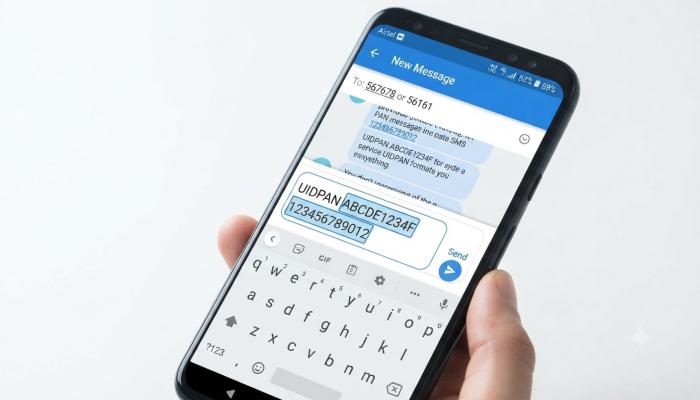
UIDPAN <12-digit Aadhaar> <10-digit PAN>
Send to: 567678 or 56161
Example: UIDPAN 123456789012 ABCDE1234F
You’ll receive a reply confirming whether your PAN and Aadhaar are linked. This method works on any basic phone — no smartphone needed.
Pro-Tip: The SMS method is especially useful for people checking on behalf of elderly parents who may not have easy access to the internet. Save this number in their phone contacts as “PAN-Aadhaar Check.”
PAN Aadhaar Link Status on Groww
If you’re a Groww user and you’ve seen a warning banner inside the app about your PAN-Aadhaar linking status, here’s what’s actually happening.
Groww — like all SEBI-regulated investment platforms — is required to verify that your PAN is active before allowing trades. So:
- If Groww shows your PAN as unlinked, it means their system hasn’t received confirmation from the Income Tax Department yet — even if you’ve already linked
- The status on Groww typically updates 4–5 working days after successful linking
- To check the actual status, Groww itself redirects you to the official Income Tax portal (the same URL in Method 1 above)
If Groww is blocking your trades:
- First, check the official Income Tax portal to confirm your actual link status
- If it shows “Linked” there but Groww still shows a warning, wait 4–5 working days
- If it’s been longer, raise a ticket with Groww support citing your Income Tax portal confirmation
What To Do If Your PAN Is Inoperative (Deadline Has Passed)
Both main deadlines — May 31, 2024 (for most people) and December 31, 2025 (for those with Aadhaar Enrolment ID-based PANs) — have passed. But you can still fix this.
Here’s the exact process:
Step 1 — Pay the ₹1,000 penalty:
- Go to incometax.gov.in → Click “Link Aadhaar” under Quick Links
- Enter your PAN and Aadhaar, click “Continue to Pay Through e-Pay Tax”
- Enter your PAN again, then a mobile number for OTP verification
- After OTP, go to the Income Tax tile → Select “Other Receipts (500)” as payment type
- Select the relevant Assessment Year and complete payment
- Save the challan — you’ll need it
Step 2 — Submit the linking request: After payment is verified (usually within a few hours), revisit the Link Aadhaar page and complete the linking form.
Step 3 — Wait: Your PAN becomes operative within 7–30 days after UIDAI validates your details.
Important: Do NOT pay in multiple smaller challans hoping they’ll add up to ₹1,000. The payment must be made in a single challan under Minor Head Code 500. Multiple smaller payments won’t count.
Also Read: The Best UPI Payment App for Beginners (Honest Guide for 2026)
Fixing a “Details Mismatch” Error
This is the most frustrating situation — you try to link, and the system keeps rejecting it because the name or date of birth on your PAN doesn’t match your Aadhaar.
The most common mismatches we’ve seen:
- Maiden name on Aadhaar vs. married name on PAN (or vice versa)
- Abbreviated name on one document, full name on the other
- Date of birth listed as only a year on Aadhaar
Fix the mismatch before paying the fee — otherwise your request will fail even after payment.
- To correct PAN details: Visit a Protean (formerly NSDL) or UTIITSL PAN service centre, or apply online at onlineservices.nsdl.com
- To correct Aadhaar details: Visit an Aadhaar Seva Kendra with valid proof documents, or update online via myaadhaar.uidai.gov.in (for name/DOB, in-person verification is required)
After corrections, allow a few days for updates to reflect before re-submitting the link request.
Who Doesn’t Need to Link PAN and Aadhaar?
You are exempt from the mandatory linking requirement if you:
- Reside in Assam, Jammu & Kashmir, or Meghalaya
- Are a Non-Resident Indian (NRI) without an Aadhaar number
- Hold a Person of Indian Origin (PIO) or Overseas Citizenship of India (OCI) card
- Are a foreign national residing in India
Even if you fall under an exempt category but want to link voluntarily, you can — just note that the ₹1,000 fee still applies.
Visual Asset Strategy

Frequently Asked Questions (People Also Ask)
Q: How do I check my PAN Aadhaar link status without logging in? Go to the Income Tax portal’s pre-login status page, enter your PAN and Aadhaar number, and click “View Link Aadhaar Status.” No account or OTP is needed. The result appears instantly.
Q: What does “linking in progress” mean on the Income Tax portal? It means your request has been submitted and is currently being validated by UIDAI. This is a normal transitional status. Do not submit another request — it won’t speed things up. Wait 7–10 working days and check again.
Q: How long does it take for PAN Aadhaar link status to update after payment? After paying the ₹1,000 fee and submitting the link request, the status typically updates within 7–30 days once UIDAI validates your details. Groww and other investment platforms may take an additional 4–5 working days beyond that.
Q: My PAN is inoperative. Can I still file an ITR? You should link your PAN with Aadhaar immediately. An inoperative PAN can prevent tax refunds, block TDS credits, and create complications during ITR filing. Pay the ₹1,000 fee and submit the linking request through the Income Tax portal.
Q: Why does Groww show my PAN as unlinked even though I’ve already linked it? Groww’s systems sync with the Income Tax Department’s database periodically. After successful linking on the official portal, it can take 4–5 business days for Groww’s records to update. Check the official portal first — if it shows “Linked,” your Groww status will follow.
Q: What if my name on PAN and Aadhaar don’t match? Correct the mismatch before attempting to link or paying the fee. Update your PAN details at a Protean/UTIITSL centre or correct your Aadhaar at an Aadhaar Seva Kendra. Attempting to link with mismatched details will result in a “validation failed” error.
Q: Is there an offline way to check PAN Aadhaar link status? Yes — send an SMS in the format UIDPAN <Aadhaar Number> <PAN> to 567678 or 56161. You’ll receive a reply confirming your link status. This works on any mobile phone without internet.
Your Next Step Checklist
Don’t leave this page without completing these steps:
- [ ] Check your status right now at the Income Tax portal (takes 60 seconds, no login needed)
- [ ] If “Linked” — screenshot or note it down for your records. Done.
- [ ] If “In Progress” — mark your calendar for 10 working days from now and recheck. Don’t do anything else.
- [ ] If “Not Linked” — check for a name/DOB mismatch first. If details match, pay the ₹1,000 fee in a single challan (Minor Head 500) and submit the link request.
- [ ] If “Details Mismatch” — identify which document has the error, correct it at the relevant centre, wait for the update to reflect, then re-link.
- [ ] If you use Groww or any investment platform — after linking, wait 4–5 working days before expecting the status to update there too.