Best Earning Apps in 2026: A Beginner’s No-Nonsense Guide


I once watched a friend spend three weeks tapping through a “daily earn money app” that promised ₹1,000 a day. Her balance hit ₹4,800. Withdrawal day came. The app asked for a “verification fee” of ₹299. She paid it. The app asked for another fee. That’s when she called me.
She never saw a rupee of that ₹4,800, and she’s not alone — this exact pattern shows up in scam reports across India, the Philippines, and the US every single week. If you’ve been scrolling through Play Store listings wondering which earning apps are actually real, this guide is built to save you that exact headache.
We’ll walk through which apps genuinely pay, how much you can realistically expect to earn, the red flags that separate a legit app from a trap, and a step-by-step way to start today — on Android, iPhone, or even your PC.
Why This Topic Actually Matters
Earning apps aren’t going away. Mobile app developers are projecting continued double-digit growth in downloads this year, and that’s not surprising — between commute time, lunch breaks, and evenings on the couch, most of us have pockets of idle time we’d happily trade for a little extra cash.
But here’s the part most articles skip: the earning-apps space is now flooded with copycats. For every Swagbucks or Fiverr, there are a dozen apps with names like “CashBlast Pro” that exist purely to harvest your contacts list and serve you ads until you give up. Knowing the difference isn’t optional anymore — it’s the whole game.
What Are Earning Apps? (Quick Definition)
Earning apps are mobile or desktop applications that pay users real money or redeemable rewards for completing simple tasks — surveys, watching videos, testing products, sharing referral links, freelancing gigs, or sharing idle device resources like bandwidth. Payouts typically arrive via PayPal, UPI, gift cards, or bank transfer once you hit a minimum threshold.
There are five broad categories, and almost every app on the market fits into one:
- Task & survey apps — paid for opinions, polls, or short surveys (e.g., Google Opinion Rewards)
- Cashback & shopping apps — a cut of what you’d spend anyway
- Freelance/skill platforms — paid for actual work (writing, design, virtual assistance)
- Affiliate/referral apps — commission for sharing product links
- Passive/bandwidth apps — minimal effort, modest and slow payouts
Also Read: UPI Apps in India: The Complete 2026 Guide for Beginners
How Much Can You Actually Earn? (Set Realistic Expectations First)
This is the section most “Top 10 Earning Apps” listicles gloss over, and it’s exactly where beginners get burned. So let’s be blunt.
Pro Tip — the “$3 test”: Before trusting any earning app with your time, search “[app name] withdrawal proof” on YouTube or Reddit, sorted by most recent. If the comments are full of “still pending after 30 days,” that’s your answer. I’ve used this single trick to filter out more fake apps in five minutes than any amount of reading reviews on the Play Store itself, because Play Store reviews can be bought — Reddit threads from frustrated, unpaid users almost never are.
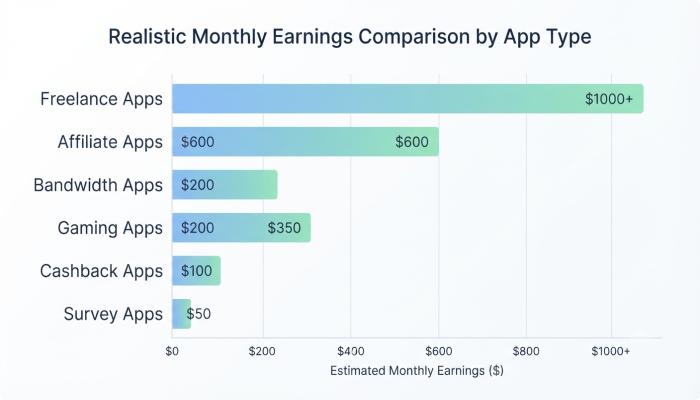
Here’s a grounded look at typical earnings by app type:
| App Type | Realistic Monthly Earnings | Effort Required |
|---|---|---|
| Survey/task apps (Swagbucks, ySense, Toluna) | $20–$80 | 30–60 min/day |
| Cashback apps (Rakuten, Fetch) | $10–$50 | Near zero (passive) |
| Bandwidth-sharing apps (Honeygain, Pawns) | $1–$5 | Zero after setup |
| Affiliate/referral apps (EarnKaro-style) | $30–$300+ | Depends heavily on your network/audience |
| Freelance platforms (Fiverr, Upwork) | $100–$2,000+ | Real skill + real hours |
| Gaming reward apps (Mistplay) | $5–$15 | 1–2 hrs/day |
Notice the pattern: anything promising more than this, with less effort, is the exception that should make you suspicious — not excited.
Best Daily Earn Money Apps for Android (No Investment Needed)
Android has the widest selection simply because Google Play’s open ecosystem supports more reward-app categories than iOS does. Here are categories worth your time, with examples that have verifiable track records:
1. Survey & Micro-Task Apps
Examples: Google Opinion Rewards, Toluna, ySense How it works: Answer short surveys or complete small digital tasks; points convert to cash or gift cards once you hit the payout minimum.
2. Cashback Apps
Examples: Rakuten, Fetch How it works: Shop normally, scan receipts or shop through the app’s link, and get a percentage back.
3. Gaming Reward Apps
Examples: Mistplay (Android-exclusive) How it works: Play featured mobile games; the longer you play and the more you progress, the more points you accumulate.
4. Bandwidth-Sharing Apps
Examples: Honeygain, Pawns App How it works: Your idle internet bandwidth gets shared with businesses for research purposes. Honeygain can run on up to 10 devices per account, with each device needing a different IP address for higher earnings. It’s genuinely passive, but don’t expect more than a few dollars a month.
Common Pitfall: Installing five “earning apps” at once because more apps should mean more money. In reality, more than seven or eight apps becomes unmanageable to track, and the marginal earnings from app #8 rarely justify the storage, battery drain, and notification spam it adds to your phone.
Make Money Cash Earning Apps Without Investment (Step-by-Step for Beginners)
If you’re starting from zero, here’s the exact sequence I’d recommend to someone new:
- Pick one category first. Don’t download ten apps on day one. Choose either surveys, cashback, or freelancing based on how much time you actually have.
- Verify before you commit. Search “[app name] payout proof” before creating an account.
- Use a dedicated email. Keep earning-app signups separate from your primary inbox to avoid spam creep.
- Set a 7-day test window. Use the app daily for a week and track actual earnings against time spent. If your effective hourly rate is uncomfortably low, move on.
- Withdraw early and often. As soon as you hit the minimum threshold, cash out — don’t let a “scam app” build a tempting balance you’ll never see.
- Reinvest your time, not your money. If an app ever asks for a deposit, fee, or “verification payment” to unlock your own earnings, that’s your exit cue.
Earning Apps for PC: Can You Make Money Without a Smartphone?
Yes — and this is genuinely underserved by most existing guides, since almost everyone writes “earning apps” as Android-only content despite a meaningful chunk of searchers specifically wanting “online earning apps for PC.”
- Freelance platforms (Fiverr, Upwork, PeoplePerHour) work identically, often better, on desktop — easier file uploads, faster typing for proposals.
- Survey panels (Prolific, Survey Junkie) usually have browser-based dashboards that are more comfortable to use on PC than mobile.
- Print-on-demand platforms (Printify, Etsy) lean heavily on desktop for design and store setup.
- Bandwidth-sharing apps like Honeygain also run as desktop clients on Windows, macOS, and Linux, not just mobile.
The PC route tends to suit people aiming for freelancing or selling, while mobile apps suit people wanting quick, fragmented micro-earning during downtime.
Also Read: Best Loan Apps in India (2026): Get Instant Cash in Minutes
Red Flags: How to Spot a Fake Earning App Before It Wastes Your Time
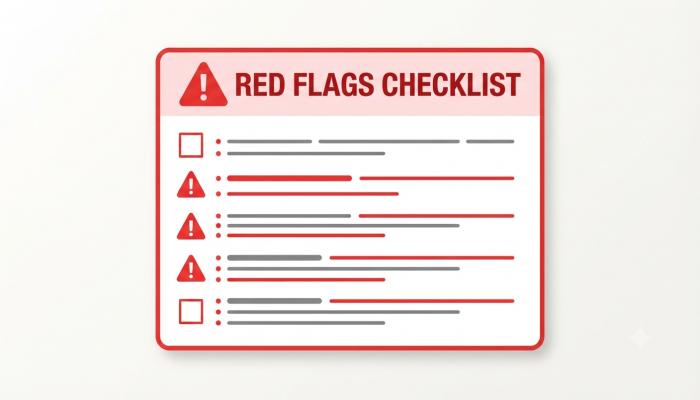
This is the section I wish existed before my friend lost her ₹299. Watch for these signs:
- Unrealistic daily promises — ₹1,000+/day or $50+/day for tapping and watching ads. The math behind ad revenue simply doesn’t support that.
- Any upfront fee — “verification,” “activation,” or “membership upgrade” charges to unlock your own earnings. A real earning app will never ask you to pay money to start earning money.
- No verifiable company info — no working website, no LinkedIn page, no support email that actually responds.
- APK-only distribution with no Play Store listing — not always a scam, but a major risk multiplier when combined with other flags.
- Withdrawal thresholds that keep moving — you’re told you suddenly need “500 more tasks” right as you approach the minimum.
- Reviews that are all five stars with no detail — genuine apps almost always have some mixed or critical reviews; that’s a sign of authenticity, not a flaw.
- Pressure to recruit friends to “unlock” your own balance — this is a referral-pyramid structure, not a genuine earning model.
Money Earning Apps APK Download: Is It Safe?
Searching “money earning apps APK download” instead of going through the Play Store is one of the riskiest habits in this whole space, and it’s worth addressing directly.
Sideloaded APKs skip Google Play’s security screening entirely. That doesn’t automatically mean an app is fake — some legitimate real-money gaming apps are APK-only due to regional restrictions — but it does mean you’re trusting the app’s permissions and code with zero independent verification. If you ever do sideload an app, check that:
- The developer has a verifiable presence outside the app itself (real website, real contact info)
- You’re downloading from the official site, not a third-party APK mirror
- The app doesn’t request permissions unrelated to its function (an earning app asking for your contacts and SMS access, for instance, deserves real scrutiny)
For beginners, sticking to Play Store or App Store listings removes most of this risk without much downside.
Visual Asset Strategy
Red Flags Checklist Graphic
Frequently Asked Questions
Are earning apps without investment actually legit? Yes, many are — survey panels, cashback apps, and freelance platforms operate on real business models (advertiser budgets, affiliate commissions) and don’t need your money to function. The key is distinguishing these from apps that mimic the same format purely to harvest data or stall withdrawals indefinitely.
Which earning app pays the most for beginners? Freelance platforms like Fiverr or Upwork have the highest earning ceiling, but they require an actual skill. For pure beginners with no specific skill yet, survey and cashback apps offer the most realistic, low-effort starting point — just at a lower ceiling.
Can I use earning apps on PC without a smartphone? Yes. Freelance platforms, survey panels, and several bandwidth-sharing apps all have desktop versions or browser dashboards that work fully without a phone.
Do earning apps ask for bank details, and is that safe? Sharing a UPI ID or PayPal email for receiving payment is normal and low-risk. Sharing your UPI PIN, bank password, or OTPs is never required by a legitimate app — treat any request for these as an immediate red flag.
How long does it take to get your first payout? This varies widely by app and payout threshold. Apps with low minimums can pay out within days; apps with high thresholds can take weeks of consistent use. Testing a small withdrawal early is the best way to confirm an app is genuine before investing more time.
Is it normal for an earning app to have negative reviews? Yes — and it’s actually a good sign. Apps with only five-star reviews and no detailed critical feedback are more likely to be using incentivized or fake reviews than apps with an honest, mixed review spread.
What’s the difference between a daily earn money app and a freelance app? Daily earn apps (surveys, cashback, bandwidth-sharing) pay small, consistent amounts for minimal effort and no specific skill. Freelance apps pay significantly more but require you to deliver actual client work — writing, design, development, and so on.
Your Next Step: A Beginner’s Action Checklist
Don’t close this tab and forget about it. Here’s exactly what to do in the next 20 minutes:
- [ ] Pick one category (surveys, cashback, or freelancing) based on your available time
- [ ] Search “[app name] withdrawal proof” before installing anything
- [ ] Download directly from Play Store/App Store — skip APK mirrors for now
- [ ] Set a 7-day test window and log actual time spent vs. earned
- [ ] Withdraw as soon as you hit the minimum threshold — don’t let balances sit
- [ ] Bookmark this guide’s red-flag list and re-check any new app against it before signing up