EPFO Guide: How to Login, Check Your Passbook & File a Claim Online


Your PF money is sitting in an account right now — and most people have no idea how to access it.
If you’ve ever stared at a salary slip wondering what “EPF deduction” even means, or panicked when you needed to withdraw your provident fund and had no clue where to start — you’re not alone. I’ve spoken to dozens of salaried employees who didn’t even know they had a UAN number until they desperately needed one.
This guide cuts through all the confusion. By the end, you’ll know exactly how to log into the EPFO member portal, read your passbook, and file a claim — without calling HR even once.
What Is EPFO?
EPFO (Employees’ Provident Fund Organisation) is India’s government body that manages retirement savings for salaried employees. Every month, 12% of your basic salary is deposited into your EPF account. Your employer matches it. EPFO holds and manages those funds until you retire — or claim them earlier.
Why Your EPFO Account Actually Matters
Here’s something most first-timers miss: your EPF balance isn’t just a retirement fund. It’s a financial safety net you can tap into during a medical emergency, a home purchase, or even a prolonged job gap.
The current EPF interest rate (8.25% for FY 2023–24) beats most fixed deposits. That money grows — whether you’re watching it or not. But only if your KYC is linked, your UAN is activated, and your Aadhaar is seeded. Ignore any of those steps, and your claim will get rejected.
How to Do EPFO Member Login (Step-by-Step)
You need two things before anything else: your UAN (Universal Account Number) and a mobile number registered with EPFO.
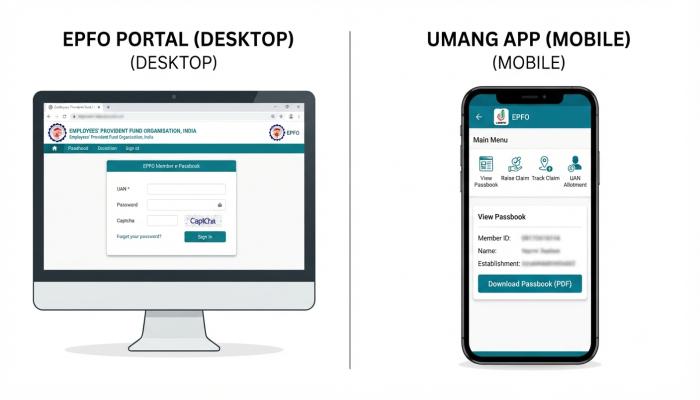
Step 1: Go to the official EPFO member portal → https://unifiedportal-mem.epfindia.gov.in/memberinterface/
Step 2: Enter your UAN and password. If it’s your first time, click “Activate UAN.”
Step 3: A One-Time Password (OTP) is sent to your registered mobile number. Enter it.
Step 4: You’re in. Your dashboard shows your PF balance, linked member IDs, and KYC status.
⚠️ Common Pitfall: Don’t confuse the EPFO employer portal with the member portal. They look similar but serve different users. The member login URL ends in
/memberinterface/.
Don’t have your UAN? Ask your HR department — it’s on your salary slip or Form 16. You can also find it on the EPFO portal using your Aadhaar or PAN number.
How to Check Your EPFO Passbook Online
Your EPF passbook shows every contribution, interest credit, and withdrawal — like a mini bank statement for your retirement account.
To access your EPFO passbook:
- Log in at the EPFO member portal (steps above)
- Click on “View Passbook” under the “Account” section
- Select your member ID (you may have more than one if you’ve changed jobs)
- Your passbook downloads as a PDF
Pro Tip: Passbook data is typically updated on the 15th–20th of each month. If your latest contributions aren’t showing, wait a few days before raising a grievance.
Alternatively, use UMANG App (more on this below) — it’s faster and shows the balance without a full PDF download.

EPFO Online Claim: How to Withdraw Your PF Without an Employer
This is where most people get stuck. The good news: you can now file an EPFO online claim entirely on your own — no employer signature required — as long as your UAN is KYC-verified.
Eligibility Check Before You Claim:
- UAN must be activated
- Aadhaar, PAN, and bank account must be linked and verified
- You should have been unemployed for at least 2 months (for full withdrawal)
How to File an EPF Online Claim:
- Log into the EPFO member portal
- Go to Online Services → Claim (Form-31, 19 & 10C)
- Enter your bank account number (last 4 digits) for verification
- Choose the claim type:
- Form 19 → Full PF settlement (on resignation/retirement)
- Form 31 → Partial withdrawal (medical, education, marriage, home)
- Form 10C → Pension withdrawal
- Upload required documents (Aadhaar, bank details — usually pre-filled)
- Submit and receive a claim reference number via SMS
Typical processing time: 7–20 working days. Track your claim status under “Track Claim Status” in the portal.
⚠️ Common Pitfall: If your name in the EPFO records doesn’t exactly match your Aadhaar (even a middle name difference), the claim will be rejected. Correct this under “Profile → Modify Basic Details” before applying.
Also Read: How to Port SIM Number: A Beginner’s Guide to Switching Networks Without Losing Your Number
EPFO on UMANG App — The Faster Alternative
UMANG (Unified Mobile Application for New-age Governance) is the government’s all-in-one app that includes EPFO services — and honestly, I find it more convenient than the web portal for quick balance checks.
What you can do on UMANG for EPFO:
| Feature | Web Portal | UMANG App |
|---|---|---|
| Member Login | ✅ | ✅ |
| Passbook View | ✅ | ✅ |
| Raise Claim | ✅ | ✅ |
| Claim Status | ✅ | ✅ |
| KYC Update | ✅ | ❌ (limited) |
| Raise Grievance | ✅ | ✅ |
To access EPFO on UMANG:
- Download UMANG from Google Play or the App Store
- Register with your mobile number
- Search “EPFO” in the search bar
- Login with your UAN and MPIN
KYC for EPFO: The Step Nobody Talks About
You can’t claim a single rupee if your KYC isn’t done. Full stop.
KYC means linking your Aadhaar, PAN, and bank account to your UAN. Here’s how:
- Log into the member portal
- Go to Manage → KYC
- Add Aadhaar (auto-verified via UIDAI), PAN, and bank details
- Wait for employer approval (takes 1–3 days usually)
Pro Tip — Information Gain: If your employer is slow to approve your KYC, you can use the “Aadhaar OTP e-KYC” option, which bypasses employer approval entirely and verifies your Aadhaar directly with UIDAI. Most guides don’t mention this shortcut.
Also Read: Jio SIM Card: Price, Home Delivery & Activation — Everything You Need to Know
Semantic FAQ (People Also Ask)
Q1: What is EPFO and who does it cover?
EPFO is the Employees’ Provident Fund Organisation of India. It covers all employees in organizations with 20 or more workers. Both employee and employer contribute 12% of basic salary monthly to the EPF account.
Q2: How do I find my UAN number?
Your UAN is printed on your salary slip, Form 16, or any EPF-related SMS from EPFO. You can also retrieve it from the EPFO portal using your Aadhaar or PAN under the “Know Your UAN” option.
Q3: Can I withdraw my full PF balance online without employer help?
Yes — if your UAN is KYC-verified (Aadhaar, PAN, and bank account linked and approved), you can file Form 19 online for a full settlement after 2 months of unemployment, with no employer signature needed.
Q4: How long does an EPFO online claim take to process?
Most online claims are processed within 7–20 working days. You’ll receive an SMS update at each stage. Claims with KYC mismatches or incomplete documents take longer or get rejected.
Q5: What is the EPFO UMANG app used for?
UMANG is a government mobile app that lets you check your EPF balance, view your passbook, raise a claim, and track its status — all from your phone without logging into the web portal.
Q6: What is the current EPF interest rate?
For FY 2023–24, the EPF interest rate is 8.25% per annum, credited annually to your account by EPFO.
Q7: What happens to my EPF if I change jobs?
Your UAN stays the same across all employers. Your new employer will link a new member ID to the same UAN. You can transfer your old PF balance using Form 13 online — it doesn’t get lost.
Your Next Step Checklist
Don’t just read this and move on. Here’s what to actually do right now:
- [ ] Find your UAN — check your salary slip or ask HR
- [ ] Activate your UAN on the EPFO member portal if you haven’t yet
- [ ] Complete KYC — link Aadhaar, PAN, and bank account
- [ ] Check your passbook — verify all contributions are being deposited correctly
- [ ] Download UMANG — for quick mobile access going forward
- [ ] Bookmark your claim status page — so you’re never hunting for it in an emergency
Your provident fund is your money. The EPFO portal puts you in control of it — but only once you know how to use it. Log in today, spend 10 minutes verifying your KYC, and you’ll have one less thing to stress about during a job transition or financial emergency.