Best Gaming Mouse for Beginners: The Only Guide You Need in 2026

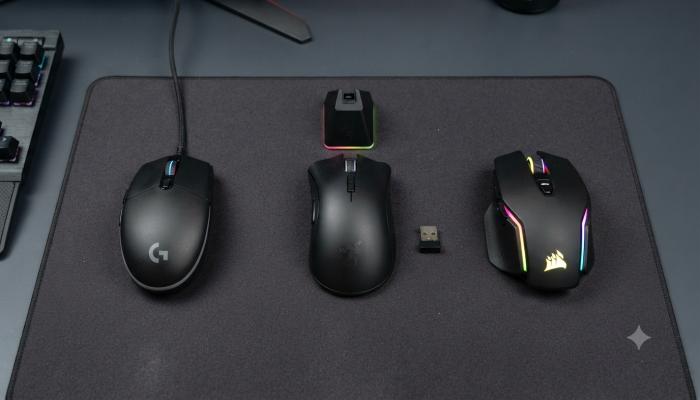
I still remember the first “gaming mouse” I bought. It had seven RGB zones, a box that screamed “16,000 DPI PRO GAMER,” and a price tag that made my wallet cry. Three weeks later, the scroll wheel started skipping and one of the side buttons died.
That mouse taught me more about what not to buy than any spec sheet ever could.
If you’re staring at a sea of options right now — wired vs wireless, RGB vs no RGB, ₹200 vs ₹2,000 — and have no idea what actually matters, you’re in the right place. We’re going to cut through the marketing noise and get you to a mouse that actually fits how you play, not how a banner ad wants you to spend.
Why Your Mouse Matters More Than You Think
A keyboard handles your movement. Your mouse handles your aim — and in most competitive games, aim wins more fights than reflexes ever will. A cheap office mouse has a slower sensor, inconsistent tracking, and buttons that aren’t built for thousands of clicks per session. Swap it for even a budget gaming mouse, and the difference in how your crosshair “feels” is immediate. This isn’t about needing the most expensive gear — it’s about removing a bottleneck between your hand and your screen.
What Is a Gaming Mouse, Exactly?
A gaming mouse is a mouse built with a higher-precision optical sensor, faster polling rate, programmable buttons, and more durable switches than a standard office mouse — designed to track fast, accurate movement with minimal input lag.
That’s it. Everything else — RGB lighting, fancy shells, software suites — is preference, not performance.
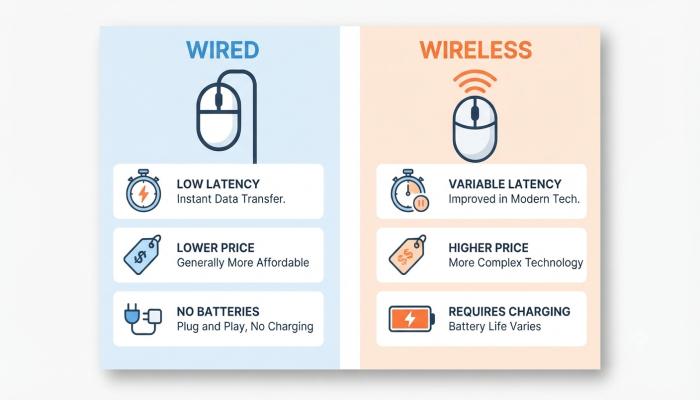
Wired vs Wireless Gaming Mouse: Which Should Beginners Buy?
This is the single most common question I get from people buying their first gaming mouse, so let’s settle it clearly.
| Factor | Wired Gaming Mouse | Wireless Gaming Mouse |
|---|---|---|
| Latency | Effectively zero | Near-zero with 2.4GHz dongle (avoid Bluetooth for gaming) |
| Price (entry point) | Lower — solid options from ₹300–₹600 | Higher — decent ones start around ₹1,500–₹2,500 |
| Weight | Lighter shells more common at budget tier | Often heavier due to battery, though flagships are now sub-60g |
| Maintenance | None | Charging or battery swaps needed |
| Best for | Beginners, tight budgets, LAN setups | Clean desk setups, no cable drag, growing competitive scene |
My honest take: if you’re a beginner on a budget, go wired. A wired mouse under ₹500 with a real optical sensor will outperform an unknown-brand wireless mouse at the same price every single time. Wireless is worth it once you’ve used a gaming mouse for a few months and know cable drag actually bothers you — don’t pay the wireless tax before you’ve felt the problem it solves.
Pro Tip (the one most guides skip): Cheap wireless mice under ₹1,500 from unknown brands often run a generic 2.4GHz radio that throttles its polling rate under load — meaning it feels wireless but introduces stutter exactly when you need precision most, like a sudden flick shot. If you’re buying wireless on a budget, check that the listing explicitly names a real sensor (PixArt is the brand to look for) rather than just a big DPI number.
Gaming Mouse Under ₹200: What You’re Actually Getting
Let’s be upfront: a genuinely good gaming-grade mouse rarely exists under ₹200. At this price, you’re buying an office mouse with gaming branding — RGB stickers and a higher DPI number printed on the box, not a better sensor underneath.
Should you buy one? Only if:
- This is a backup mouse, not your main one
- You’re testing whether you even enjoy PC gaming before investing further
- It’s for a shared family PC or a kid’s first setup
If any of that fits, fine — go for it. But set expectations: durability and tracking consistency will be the first things to suffer.
Gaming Mouse Under ₹500: The Real Sweet Spot for Beginners
This is where it gets interesting, and it’s genuinely the best entry price point in India right now. For ₹300–₹500, you can find wired gaming mice with real optical sensors, 3,200–7,200 DPI ranges, basic RGB, and 3–7 programmable buttons.
Also Read: OTT Apps in India: The Beginner’s Guide to Choosing, Downloading, and Actually Using Them
What to look for under ₹500:
- A named sensor (even an older PixArt chip beats an unnamed “high DPI” sensor)
- Optical (not mechanical) main switches if available — they resist double-click failure longer
- A wired connection — don’t chase wireless at this price
- At least a 1-year warranty from an Indian seller
Common Pitfall to Avoid
Don’t get seduced by the DPI number on the box. A mouse advertising 12,000 DPI for ₹250 almost certainly has a worse sensor than one advertising 3,200 DPI from a known brand at the same price. Most gamers — including competitive players — play at 400–1,600 DPI anyway. DPI is sensitivity, not quality. It’s the most common trap beginners fall into, and box marketing knows it.
Gaming Mouse Under ₹500–₹5,000 (Wireless Step-Up)
If your budget can stretch a bit further and wireless genuinely matters to you — clean desk, no cable drag, maybe a media-room PC — this is the tier where wireless starts making real sense. You’ll find mice with tri-mode connectivity (wired, 2.4GHz, Bluetooth), proper PixArt sensors, and 40–60+ hour battery life. At this tier, check specifically for 2.4GHz mode, not just Bluetooth — Bluetooth polls far slower and introduces noticeable lag in fast-paced games, while 2.4GHz performs close to identical to a wired connection.
RGB Gaming Mouse: Worth It, or Just Marketing?
RGB lighting changes exactly one thing: how your setup looks. It has zero impact on tracking, click speed, or accuracy. That said, there’s nothing wrong with wanting your setup to look good — just don’t let RGB push you toward a worse sensor because the lighting looked cooler in the product photo. Buy the sensor first, the lighting second.
Razer vs Logitech: The Brand Question Every Beginner Asks
Both are excellent, reliable brands — the choice usually comes down to shape and software, not raw performance.
- Logitech tends to win on battery life, build consistency, and beginner-friendly software (Logitech G HUB). The G102/G203 series is one of the most recommended entry gaming mice in India for a reason — predictable shape, dependable sensor, wide warranty network.
- Razer tends to win on RGB customization (Chroma) and shape variety, especially for claw-grip players. Synapse software has more depth but a steeper learning curve.
Beginner recommendation: if you genuinely cannot decide, go Logitech for your first mouse. The shape is more universally comfortable, and you’ll spend less time fighting software just to get basic settings configured.
How to Choose the Right Gaming Mouse: Step-by-Step
- Set your real budget first — not what you wish you could spend, what you’ll actually pay today.
- Decide wired or wireless based on the comparison above, not hype.
- Check the grip style you’ll likely use — palm grip wants a bigger shell, claw/fingertip grip wants something flatter and lighter.
- Look up the actual sensor name in the listing, not just the DPI number.
- Check return/warranty policy — this matters more at budget price points where quality control varies.
- Ignore the RGB and button count until steps 1–5 are settled.
Frequently Asked Questions
Is a wired or wireless mouse better for gaming?
For beginners and budget buyers, wired is better — zero latency, lower price, and no charging to manage. Wireless becomes worth it once you’ve outgrown a budget mouse and want a cleaner desk setup.
What DPI is good for gaming?
Most gamers, including professionals, play between 400 and 1,600 DPI. Higher DPI numbers on the box are mostly marketing — sensor quality matters far more than maximum DPI.
Is RGB lighting necessary on a gaming mouse?
No. RGB is purely cosmetic and has no effect on performance, tracking, or speed.
Can I use a gaming mouse for normal office work?
Yes — gaming mice work fine for everyday use and are often more comfortable and durable than standard office mice.
Is Logitech or Razer better for beginners?
Both are reliable. Logitech generally has friendlier software and broader comfort across grip styles, making it a safer first pick for most beginners.
Do I need a gaming mouse pad too?
Not strictly, but a basic cloth mousepad noticeably improves tracking consistency over a bare desk or glass surface, especially for optical sensors.
How long should a budget gaming mouse last?
With normal use, a decent budget mouse (₹300–₹500) should last 1–2 years before button wear becomes noticeable. Look for ones rated for 3–10 million clicks on the main buttons.
Your Next Step: A Quick-Start Checklist
Before you add anything to cart, run through this:
- [ ] I know my real budget (₹200 / ₹500 / ₹500–₹5,000 tier)
- [ ] I’ve decided wired or wireless based on actual need, not hype
- [ ] I’ve checked the listing for a named sensor, not just a DPI number
- [ ] I’ve confirmed warranty and seller authenticity
- [ ] I’m buying based on grip comfort, not RGB or button count
Once you’ve ticked these off, you’re not guessing anymore — you’re buying with intent, which is exactly how you avoid ending up with my old seven-RGB-zone regret box in a drawer.
Ready to see real picks at every budget? Check out our [Top 10 Gaming Mice in India 2026, Tested and Ranked] for specific model recommendations at every price point covered in this guide.
Visual Asset Strategy
Wired vs Wireless Comparison
Sensor/DPI Explainer

Internal Pre-Writing Strategy Notes (Reference Only)
Micro-Intent Mapping:
- Early-funnel: “what is a gaming mouse” → definition-seeking
- Mid-funnel: “wired vs wireless,” “under 200,” “under 500” → comparison/budget-filtering
- Late-funnel: “Razer vs Logitech,” “RGB” → brand/feature validation before purchase
Content Gaps Found in Top-Ranking Pages:
- Most guides list products without explaining why DPI marketing is misleading for beginners specifically.
- Few articles honestly address that sub-₹200 “gaming” mice are mostly rebranded office mice.
- Almost no competitor content warns about generic 2.4GHz wireless throttling under load at budget price points — this became our Information Gain pro-tip.
Semantic Entities Used: DPI, polling rate, optical sensor, PixArt sensor, 2.4GHz wireless, Bluetooth latency, claw grip, palm grip, RGB lighting, programmable buttons, Logitech G HUB, Razer Synapse, debounce, click durability, warranty network, mechanical vs optical switches.