Smart TV Buying Guide: How to Pick the Right One Without the Headache

You’re standing in an electronics store (or scrolling Amazon at 1 AM), staring at twenty TVs that all look identical, and somehow the price tags range from ₹8,000 to ₹80,000. I’ve been there. My first Smart TV purchase, I picked one based purely on which had the biggest “SMART TV” sticker on the box. Big mistake. It choked on apps within six months.
This guide skips the jargon and gets you straight to what actually matters: screen size, real pricing, app support, and the one spec most buying guides forget to mention.
Why Picking the Right Smart TV Actually Matters
A Smart TV isn’t just a television anymore — it’s your streaming hub, your gaming display, and sometimes your home office monitor. Get the wrong one, and you’re stuck with laggy apps, a remote that needs three button presses to do anything, or a screen too small for your living room.
The stakes are higher than they used to be. Cable TV is fading. Streaming platforms like Netflix, Amazon Prime Video, and YouTube are now the default way most households watch content. Your Smart TV is the gateway to all of it, so the buying decision deserves more than five minutes of guesswork.
What Is a Smart TV? (Quick Answer)
A Smart TV is a television with built-in internet connectivity and a software platform that lets you stream apps like Netflix, YouTube, and Prime Video directly — no separate streaming device required. It connects via Wi-Fi or Ethernet and runs an operating system such as Android TV, Google TV, Tizen, or WebOS.
That’s the textbook definition. In practice, it means you turn the TV on, connect to your Wi-Fi once, and you’ve got a smart, app-ready entertainment center built right in.
Smart TV Sizes Explained: Which One Fits Your Room?
Size is the single biggest factor people get wrong. They either buy too small and squint from the couch, or too big and the picture quality looks stretched and grainy at close range.
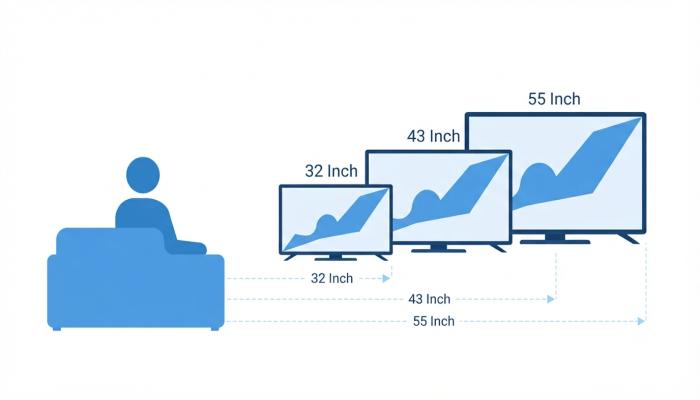
Here’s a simple rule I give beginners: measure the distance from your couch to the wall, divide by two, and that’s roughly your ideal screen size in inches.
Smart TV 32 Inch
Best for bedrooms, kitchens, or small apartments. If your viewing distance is under 5 feet, this is your size. It’s also the most budget-friendly category, which is why “Smart TV 32 inch LED under 5000” is one of the most searched terms in this segment — and yes, budget options in that range do exist, though expect basic processors and limited app stores.
Smart TV 43 Inch
The sweet spot for most Indian living rooms. Works well at a viewing distance of 6–8 feet. This is the size I recommend to most first-time buyers because it balances price, picture quality, and practicality.
Smart TV 55 Inch
Built for larger living rooms or home theater setups, ideal at 8–10 feet viewing distance. This is where you start noticing real differences in panel quality (4K becomes genuinely worth it here, unlike on a 32-inch screen where the resolution bump is barely visible).
Also Read: Best Trimmer Guide: How to Pick One Without Wasting Money (2026)
Quick Size Reference Table
| Screen Size | Ideal Viewing Distance | Best Room | Typical Price Range (India) |
|---|---|---|---|
| 32 inch | 4–5 feet | Bedroom, Kitchen | ₹8,000 – ₹15,000 |
| 43 inch | 6–8 feet | Living Room (small-mid) | ₹17,000 – ₹30,000 |
| 55 inch | 8–10 feet | Living Room (large) | ₹30,000 – ₹55,000+ |
Prices vary by brand, panel type (LED vs QLED), and ongoing sales — always check current listings before buying.
Pro-Tip: Don’t just trust the screen size. Check the bezel width too. Two 43-inch TVs can have completely different “footprints” on your TV unit because of bezel thickness — measure your unit space before ordering online.
Smart TV Price Breakdown: What You’re Actually Paying For
People search “Smart TV price” expecting a single number, but pricing depends on four real factors:
- Screen size — bigger panels cost more raw material.
- Panel type — LED is cheapest, QLED and OLED cost significantly more for better color and contrast.
- Operating system — Android TV/Google TV models with more RAM tend to cost more than budget OS builds.
- Brand premium — Samsung and LG typically charge more than budget brands for similar specs, partly due to panel quality and after-sales service.
- Smart TV Samsung: Where It Fits
Samsung is consistently one of the top-searched Smart TV brands, and for good reason — their Tizen OS is smooth, and Crystal UHD models offer solid 4K performance at the 43-inch and 55-inch range. They sit in the mid-to-premium price bracket, so if budget is your main concern, compare a Samsung Crystal series against budget-brand alternatives before deciding.
Smart TV Apps: The Part Beginners Overlook
This is the section most competitor articles rush through, and it’s where buyers get burned the most.
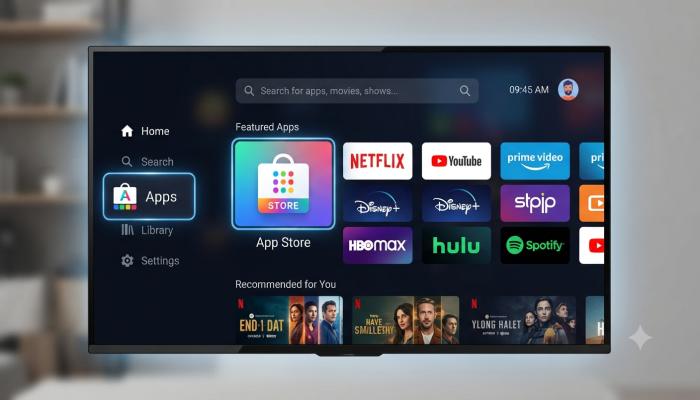
How to Download a Smart TV App
- Go to the App Store / Play Store icon on your TV’s home screen.
- Search for the app name (Netflix, Hotstar, YouTube, etc.).
- Select Install and wait for it to download.
- Once installed, open it and sign in with your account credentials.
- Pin frequently used apps to your home screen for quick access.
Common Pitfalls Box
- Buying a TV with too little internal storage. Budget Smart TVs often ship with just 8GB storage. After the OS takes its share, you’re left with room for maybe 4-5 apps before it starts lagging or refusing new installs.
- Assuming all apps are pre-installed. Many budget TVs advertise “Smart TV” but only support a handful of built-in apps with no real app store, locking you out of newer platforms entirely.
- Ignoring RAM specs. A Smart TV with 1GB RAM will struggle running modern app interfaces. Look for at least 1.5GB–2GB RAM if you want smooth multitasking.
Information Gain — The Insight Most Guides Miss: Before buying, search “[TV model name] + app store update” online. Budget brands frequently stop pushing software and app-store updates after 18-24 months, which means apps like YouTube or Netflix can eventually become outdated or stop working altogether — even though the TV hardware is still fine. I learned this the hard way with a budget 32-inch model that lost YouTube support within two years. Premium brands like Samsung and LG generally support updates for much longer, which is a real factor to weigh against the price difference.
Smart TV Remote: What Separates a Good One From a Bad One
A remote seems like an afterthought until you’re using it daily. Look for:
- Voice control (Google Assistant or Bixby) — genuinely useful for searching shows without typing on an on-screen keyboard.
- Dedicated app buttons (Netflix, Prime Video, YouTube) for one-tap access.
- Bluetooth pairing instead of infrared — no more pointing it directly at the TV.
If you lose your remote often (no judgment, we’ve all done it), most Smart TVs also support control via a companion smartphone app, which is worth checking before purchase.
Visual Asset Strategy
App Store Navigation Screenshot/Mockup
Remote Control Feature Breakdown
Frequently Asked Questions
1. What is the difference between a Smart TV and a regular TV?
A regular TV only displays content from external sources like cable or HDMI devices. A Smart TV has built-in internet and apps, letting you stream directly without extra hardware.
2. Which Smart TV size is best for a small bedroom?
A 32-inch Smart TV works best for bedrooms or small spaces where viewing distance is under 5 feet.
3. Is a 43-inch or 55-inch Smart TV better for a living room?
It depends on your room size. For viewing distances of 6-8 feet, go with 43-inch. For 8-10 feet or larger rooms, 55-inch offers a more immersive experience.
4. Can I download any app on a Smart TV?
Not always. App availability depends on your TV’s operating system and app store. Budget models sometimes have limited app stores compared to Android TV or Google TV models.
5. Do Smart TVs need a separate internet connection?
Yes, you’ll need a Wi-Fi connection or an Ethernet cable to access streaming apps and online content.
6. Why is my Smart TV remote not connecting?
This is usually a Bluetooth pairing issue or low battery. Try re-pairing through the TV’s settings menu or replacing the batteries first.
7. Are Samsung Smart TVs worth the extra price?
Samsung TVs generally offer better panel quality, longer software support, and a smoother interface, which can justify the higher price if longevity matters to you.
Your Next Step: A Quick Buying Checklist
Before you add anything to cart, run through this:
- [ ] Measured your room’s viewing distance and matched it to a screen size
- [ ] Checked RAM (1.5GB+ recommended) and storage (16GB+ recommended)
- [ ] Confirmed the operating system (Android TV/Google TV offers the widest app support)
- [ ] Searched the model name for recent software/app-store update history
- [ ] Compared at least 2-3 brands at your target price point
- [ ] Checked remote features — voice control and Bluetooth if possible
Picking a Smart TV doesn’t have to be a guessing game once you know what actually drives the price and performance differences. If you’re ready to compare real-time prices and current deals across sizes and brands, check out our latest Smart TV deals page to find the best match for your room and budget today.