HP Laptop Buying Guide: Best Models, Prices & Which One You Actually Need (2025)

Introduction
You opened 12 browser tabs. Every one of them lists specs like “8GB DDR4 RAM” and “Intel UHD 620 Graphics” — and you still have no idea which HP laptop is right for you.
You’re not alone. I’ve seen dozens of first-time laptop buyers either overspend on specs they’ll never use or underspend and regret it in six months. This guide cuts through all of that.
By the end, you’ll know exactly what HP laptop fits your budget, your workload, and your life — whether you’re a student, a home user, or someone just trying to get work done without the stress.
What Does “HP” Actually Stand For? (The Full Form)
HP stands for Hewlett-Packard — named after founders Bill Hewlett and Dave Packard, who started the company in a Palo Alto garage in 1939. Today, HP Inc. is one of the world’s largest personal computer manufacturers, shipping laptops across every price range from ₹25,000 to over ₹2,00,000.
The reason HP remains a top choice for beginners: parts are easy to service, warranty support is widespread in India, and the price-to-performance ratio is hard to beat.
HP Laptop i3 vs i5 vs i7 — Which Processor Do You Need?
This is the single most confusing part of buying a laptop. Here’s the honest breakdown:
| Processor | Best For | Real-World Speed | Price Range (HP) |
|---|---|---|---|
| Intel i3 | Web browsing, MS Office, YouTube | Smooth for light tasks | ₹25,000 – ₹38,000 |
| Intel i5 | Multitasking, Zoom calls, light editing | Noticeably faster | ₹40,000 – ₹65,000 |
| Intel i7 | Video editing, coding, heavy multitasking | Significantly powerful | ₹65,000 – ₹1,10,000 |
The honest answer most sites won’t give you: If you’re a student or home user who watches videos, types documents, and uses Chrome — an HP laptop i3 is genuinely enough. Paying for an i7 when you’re checking emails is like buying a race car to drive to the grocery store.
⚠️ Common Pitfall: People confuse generation numbers with core numbers. An Intel i5 12th Gen is faster than an i7 8th Gen. Always check the generation, not just the “i” number.
Best HP Laptops Under ₹30,000
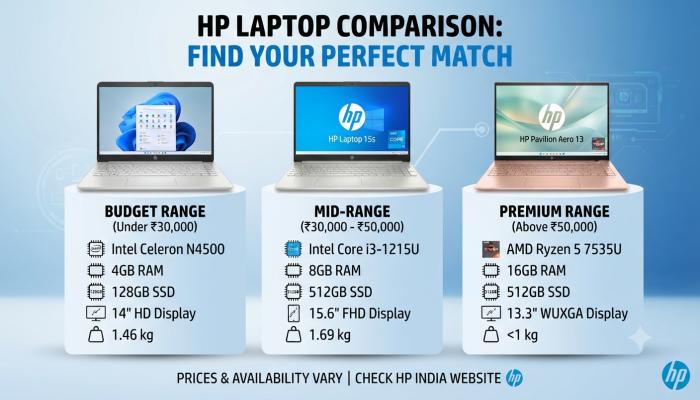
Finding a decent laptop under ₹30,000 is absolutely possible with HP — but you need to know what to look for.
What to Expect in This Budget:
- Intel i3 (10th or 11th Gen) or AMD Ryzen 3
- 8GB RAM (non-negotiable — avoid 4GB)
- 256GB or 512GB SSD
- 15.6-inch FHD display
Top Picks (HP Laptop Under ₹30,000):
HP 15s-du3xxx Series One of the most consistent performers in this range. The 11th Gen i3 variant handles everyday tasks without lag. Battery life sits at a solid 7–8 hours. If you’re a college student or someone who does basic office work, this is your sweet spot.
HP 245 G9 (AMD Ryzen 3) Slightly better graphics performance for the same price, thanks to AMD’s integrated GPU. Ideal if you occasionally watch high-definition content or use graphic-heavy web tools.
💡 Pro Tip: In this budget, prioritize SSD over processor speed. A laptop with an i3 + SSD will feel faster every single day than an i5 + HDD. The SSD makes the biggest difference in how “snappy” a computer feels to use.
Best HP Laptops Under ₹50,000
This is the sweet spot for most people reading this. You get an i5 processor, better thermal management, and a noticeably more premium build quality.
What Changes at This Budget:
- Intel i5 (11th or 12th Gen) — a genuine step up
- 8GB or 16GB RAM with upgrade options
- 512GB SSD as standard
- Better display brightness and color accuracy
- Often includes a backlit keyboard
Also Read: Best Powerbank Deals Right Now — What Actually Matters Before You Buy
Top Picks (HP Laptop Under ₹50,000):
HP Pavilion 15 (i5 12th Gen) This is the model I’d confidently recommend to most people in this range. The 12th Gen i5 handles 20+ Chrome tabs, Microsoft Office, and even light Photoshop without breaking a sweat. The Pavilion line also has a better cooling system than the budget 15s series, which means it stays fast longer under load.
HP Envy x360 (AMD Ryzen 5) If you want a touchscreen HP laptop, this is the one to look at. The 360-degree hinge means you can use it as a tablet, a tent, or a traditional laptop. It’s thinner, lighter, and feels genuinely premium. Battery life consistently hits 9–10 hours in real use.
HP Touchscreen Laptops — Are They Worth It?
Short answer: Yes — but only if you have a specific use for it.
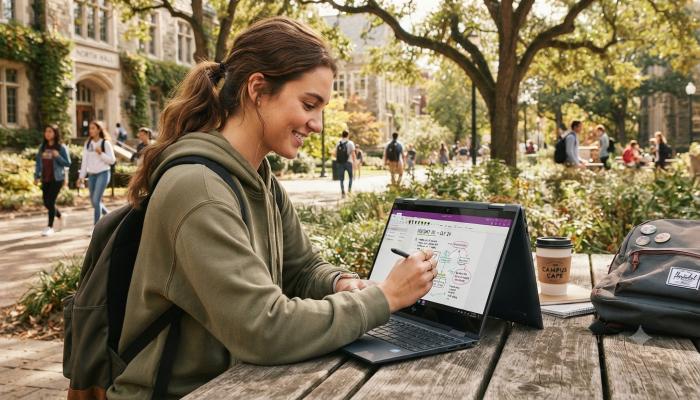
HP touchscreen laptops (like the Envy x360 or the Spectre series) make sense if you:
- Take handwritten notes in class using a stylus
- Want the flexibility of tablet mode for reading or watching content
- Do creative work like sketching or annotating documents
They do not make sense if you’re going to use the laptop 95% of the time at a desk with a mouse. Touch functionality adds cost (usually ₹8,000–15,000 more) and slightly reduces battery life. Buy it for a specific purpose, not just because it’s cool.
HP Laptop Price Overview (2025 — Quick Reference)
| Budget | Processor | Best Series | What You Get |
|---|---|---|---|
| ₹25,000 – ₹30,000 | i3 / Ryzen 3 | HP 15s, HP 245 | Basic tasks, great SSD option |
| ₹30,000 – ₹50,000 | i5 / Ryzen 5 | HP Pavilion, Envy x360 | Multitasking, touch option |
| ₹50,000 – ₹80,000 | i7 / Ryzen 7 | HP Envy, HP Spectre | Power users, creators |
| ₹80,000+ | i7/i9 / Ryzen 9 | HP Spectre, HP Omen | Gamers, professionals |
Frequently Asked Questions (People Also Ask)
Q1. What is the full form of HP laptop?
HP stands for Hewlett-Packard, the company co-founded by Bill Hewlett and Dave Packard in 1939. Today the consumer laptop division operates as HP Inc.
Q2. Which HP laptop is best for students under ₹30,000?
The HP 15s with an 11th Gen i3 processor and 512GB SSD is the top choice. It handles college workloads comfortably and has reliable battery life for a full day of classes.
Q3. Is HP i5 laptop good for everyday use?
Yes. An HP laptop with an Intel i5 processor (11th Gen or newer) handles everyday tasks, video calls, multitasking, and even light creative work without slowdowns.
Q4. Which HP laptop has a touchscreen under ₹50,000?
The HP Envy x360 (AMD Ryzen 5 version) is the best touchscreen HP laptop under ₹50,000. It features a 360-degree hinge and supports stylus input.
Q5. Is HP better than Lenovo or Dell for beginners?
HP offers better after-sales service coverage across India and more consistent build quality in the ₹30,000–₹50,000 range. For pure value, HP and Lenovo are neck-and-neck; Dell edges ahead only in premium segments.
Q6. What RAM is enough for an HP laptop in 2025?
8GB RAM is the minimum for a comfortable experience in 2025. If your budget allows, go for 16GB — especially if you plan to use the laptop for 3+ years.
Q7. Can I upgrade RAM in HP laptops?
It depends on the model. Most HP Pavilion laptops have one upgradeable RAM slot. HP Envy and Spectre models often have soldered RAM, meaning what you buy is what you’re stuck with. Always check before purchasing.
Your Next Step Checklist — Don’t Buy Until You’ve Done This
Before clicking “Add to Cart,” run through this quickly:
- [ ] Define your primary use case — studying, office work, content creation, or gaming?
- [ ] Set a hard budget — then add ₹3,000–5,000 buffer for accessories (bag, mouse)
- [ ] Confirm the processor generation — i5 12th Gen > i7 8th Gen
- [ ] Check RAM — minimum 8GB; 16GB if you multitask heavily
- [ ] SSD or HDD? — Always choose SSD. Non-negotiable.
- [ ] Decide on touchscreen — only if you have a clear reason for it
- [ ] Read the warranty terms — HP India offers 1-year onsite warranty on most models; extended plans are worth it
Wrapping Up
Most people buy more laptop than they need — or less than they deserve. The right HP laptop isn’t the most expensive one. It’s the one that matches your actual daily tasks, fits your budget honestly, and won’t feel like a mistake in two years.
If you’re a student or light user: HP 15s with i3 under ₹30,000. If you want the sweet spot: HP Pavilion i5 under ₹50,000. If you need touch and flexibility: HP Envy x360.