Tab Buying Guide 2025: Best Tablets Under ₹5,000–₹10,000 (With Pen, 5G & More)

You pick up a tablet at a store. It feels premium. You check the price — and your stomach drops.
That’s the trap most first-time tablet buyers fall into. They either overspend on features they’ll never use, or grab a cheap deal that lags after three months. I’ve seen both mistakes dozens of times, and this guide exists so you don’t make either one.
Whether you need a tab under ₹5,000 for casual use, a tab with pen support for note-taking, or a Samsung 5G tablet for college, I’ll walk you through exactly what to look for — and what to ignore.
What Is a Tab (Tablet)? A Quick Definition
A tablet (or “tab”) is a portable touchscreen computing device larger than a smartphone — typically 7 to 13 inches — designed for media consumption, note-taking, browsing, light productivity, and education. Most modern tabs run Android or iPadOS, with some running Windows.
Key specs to understand before buying:
- Display size: 8″–11″ is the sweet spot for most users
- Processor: Determines speed and multitasking ability
- RAM: 4GB minimum for smooth performance in 2025
- Storage: 64GB base, but 128GB is better for students
- Connectivity: Wi-Fi only vs. 4G/5G with SIM card support
Why the Right Tab Actually Matters
Here’s something most buying guides won’t tell you: a wrong tab purchase doesn’t just waste money — it wastes time.
A student using a slow tab with no stylus support ends up handwriting notes anyway. A professional who bought a Wi-Fi-only tab can’t join calls from a client site. A parent who grabbed the cheapest option watches it freeze during their kid’s online class.
The tab you pick shapes how you work, study, and create — every single day.
Best Tabs Under ₹5,000: What’s Actually Worth It?
Let me be direct: the under-₹5,000 tab market in India is brutal. Most options in this range are rebranded devices with slow processors and outdated software.
What to realistically expect under ₹5,000:
- Display: HD (1280×800) — acceptable for video
- Processor: Entry-level MediaTek or UNISOC chips
- RAM: 3–4GB
- Storage: 32–64GB (expandable via microSD)
- Camera: Functional, not great
- Software updates: Limited (1–2 years max)
Best picks in this range:
- Realme Pad Mini — Compact, reliable, decent battery life
- Lenovo Tab M8 (Gen 3) — Solid build, consistent performance for its class
Pro-Tip: If you’re buying a tab under ₹5,000 for a child or as a secondary device for media streaming only, these options are fine. For anything more — school projects, note-taking, productivity — stretch your budget to the next tier.
Also Read: Bluetooth Speakers: Everything a Beginner Needs to Know Before Buying
Best Tabs Under ₹10,000: The Sweet Spot
This is where things get genuinely good. The ₹6,000–₹10,000 range offers a massive jump in build quality, display sharpness, and software longevity.
What you unlock at this price:
- Full HD or 2K display
- 6GB RAM (smooth multitasking)
- Better speakers (some with Dolby Atmos)
- Longer software support (3+ years)
- Some models support stylus/pen input
Top picks:
| Tab | Price (Approx.) | Key Strength | Best For |
|---|---|---|---|
| Realme Pad 2 | ₹8,999 | Large display, long battery | Media & students |
| Lenovo Tab M10 Plus (Gen 3) | ₹9,499 | Clean UI, display quality | Everyday use |
| Samsung Galaxy Tab A7 Lite | ₹8,499 | Brand trust, compact build | Kids & casual users |
Tab with Pen: Do You Really Need One?
If you’re a student, designer, or someone who takes handwritten notes, a tab with pen (stylus) support is a game-changer — not a gimmick.
What stylus support actually enables:
- Handwriting notes directly in apps like Noteshelf or GoodNotes
- PDF annotation for study materials
- Rough sketches and diagrams for engineering/design students
- Pressure-sensitive drawing for artists
The hidden cost most people miss: Many tabs “support” a stylus but don’t include one in the box. The pen can cost ₹1,500–₹5,000 separately. Always check if the stylus is included or sold separately before buying.
Best tab with pen options:
- Samsung Galaxy Tab S9 FE — Comes with S Pen included in the box. This is genuinely rare at its price point and a major value advantage.
- Lenovo IdeaPad Pro (Tab) — Supports the Lenovo Precision Pen, excellent for students.
Common Mistake I’ve Seen: People buy a “stylus-compatible” tab, then discover their cheap ₹200 capacitive stylus doesn’t support pressure sensitivity. For real handwriting, you need an active stylus — not a rubber-tip stick.
Samsung Tab: Which One Should You Actually Buy?
Samsung dominates the Android tablet market for a reason: consistent software updates, DeX mode for desktop-like productivity, and a well-integrated ecosystem with Galaxy phones.
Here’s a quick breakdown of the current Samsung tab lineup relevant to Indian buyers:
| Model | Starting Price | Standout Feature |
|---|---|---|
| Galaxy Tab A9 | ₹12,999 | Affordable entry to Samsung ecosystem |
| Galaxy Tab A9+ | ₹16,999 | Larger display, better speakers |
| Galaxy Tab S9 FE | ₹26,999 | IP68 waterproof + S Pen included |
The Samsung Tab S9 FE is the one I’d point most buyers toward at its tier. It’s waterproof, comes with the S Pen, has a gorgeous AMOLED-like display, and gets Samsung’s lengthy software update promise. For college students and working professionals, it checks nearly every box.
5G Tablet: When Does It Actually Make Sense?
A 5G tablet makes sense if — and only if — these situations apply to you:
- You frequently work or study outside your home without reliable Wi-Fi
- You travel often and need uninterrupted video calls
- You use your tab as a primary device, not a secondary screen
If your tab mostly sits on your desk connected to home Wi-Fi, a 5G model is wasted money. A 4G LTE model is almost always sufficient for mobility needs.
Best 5G tabs in India right now:
- Samsung Galaxy Tab S9 FE 5G
- OnePlus Pad (5G variant)
Pro-Tip: Before buying a 5G tab, verify your city has strong 5G coverage on your carrier. 5G without coverage just means an expensive 4G tab.
Lenovo IdeaPad Tab Pro: The Underrated Option
Most people overlook Lenovo tablets because Samsung gets all the attention. That’s a mistake.
The Lenovo IdeaPad Pro Tab punches well above its price with:
- A sharp 2.8K display (one of the best in its class)
- JBL-tuned quad speakers — genuinely impressive for media
- Precision Pen 2 support with 4096 pressure levels
- A keyboard case accessory that turns it into a mini laptop
For engineering students or anyone doing heavy note-taking and occasional laptop replacement tasks, the Lenovo IdeaPad Tab Pro deserves a serious look before defaulting to Samsung.
What Is an Incognito Tab? (Quick Clarification)
If you searched “incognito tab” expecting a privacy feature on a browser — you’re in the right place, just the wrong section.
An incognito tab refers to a private browsing window in browsers like Google Chrome, Firefox, or Samsung Internet. It doesn’t save your browsing history, cookies, or form data on your device. It does NOT make you invisible online — your ISP and the websites you visit can still see your activity.
To open one: Chrome → three-dot menu → New Incognito Window (or press Ctrl+Shift+N on desktop).
Tab for Students: How to Choose Without Overthinking It
Here’s my simplified framework for students picking a tab:
Step 1 — Set your actual budget (include cost of accessories: pen, case, keyboard)
Step 2 — Identify your main use case:
- Note-taking → prioritize pen support
- Video lectures → prioritize display and speakers
- Programming/heavy apps → prioritize RAM and processor
Step 3 — Check software update promise (3+ years is the minimum I’d accept)
Step 4 — Read one review from a tech outlet you trust before buying
Student-focused recommendations:
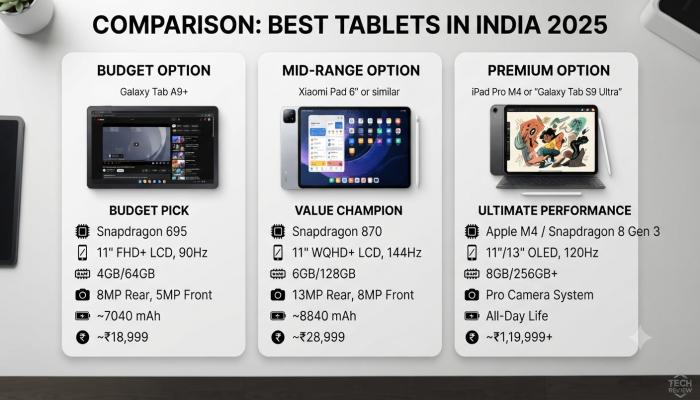
- Budget (under ₹10,000): Realme Pad 2 or Lenovo Tab M10 Plus
- Mid-range (₹15,000–₹25,000): Samsung Tab A9+ or Lenovo IdeaPad Tab
- Premium (above ₹25,000): Samsung Galaxy Tab S9 FE
Visual Asset Strategy

Image 2 — 5G connectivity visual

FAQ: People Also Ask
Q: Which is the best tab under ₹10,000 in India?
The Realme Pad 2 and Lenovo Tab M10 Plus (Gen 3) are the most balanced options under ₹10,000 in 2025, offering Full HD displays, 6GB RAM, and solid battery life for students and everyday users.
Q: Does Samsung Galaxy Tab S9 FE come with a pen?
Yes — the Samsung Galaxy Tab S9 FE includes an S Pen in the box, which is one of the biggest value advantages in its price segment. No separate purchase needed.
Q: Is a 5G tablet worth buying in India?
Only if you frequently work or study away from Wi-Fi. For home or office use, a standard Wi-Fi or 4G LTE tab is more cost-effective. Check TRAI’s coverage map for 5G availability in your city first.
Q: What is the difference between a tab with pen and a regular stylus?
A tab with pen support uses an active stylus with pressure sensitivity (like Samsung S Pen or Lenovo Precision Pen). A regular capacitive stylus is a basic rubber-tip tool — it can tap and swipe but has no pressure levels, making it unsuitable for handwriting or drawing.
Q: Is the Lenovo IdeaPad Tab Pro good for students?
Yes. It offers a sharp 2.8K display, Precision Pen 2 support, JBL quad speakers, and optional keyboard case — making it one of the best productivity-focused tablets in its price range for college students.
Q: What does incognito tab mean on a phone or browser?
An incognito tab (or private browsing mode) is a browser session that doesn’t save your history, cookies, or autofill data locally. It doesn’t make you anonymous online — your internet provider and websites you visit can still see your activity.
Q: How much RAM is enough for a tab in 2025?
For smooth performance in 2025, aim for at least 6GB RAM. 4GB is workable for basic use (streaming, browsing), but you’ll notice lag when switching between apps or running video calls alongside other apps.
Your Next Step: A Quick Pre-Purchase Checklist
Before you buy, run through this — it takes two minutes and can save you thousands:
- [ ] Budget confirmed — including pen, case, and accessories
- [ ] Primary use case identified — streaming, note-taking, productivity, or gaming
- [ ] Stylus need assessed — active stylus or not? Is it included in the box?
- [ ] 5G need verified — will you use this primarily outside with a SIM card?
- [ ] Software update promise checked — minimum 3 years for anything you’ll use for school
- [ ] One hands-on review read from a source like 91mobiles, GSMArena, or NDTV Gadgets